What Is EDID?
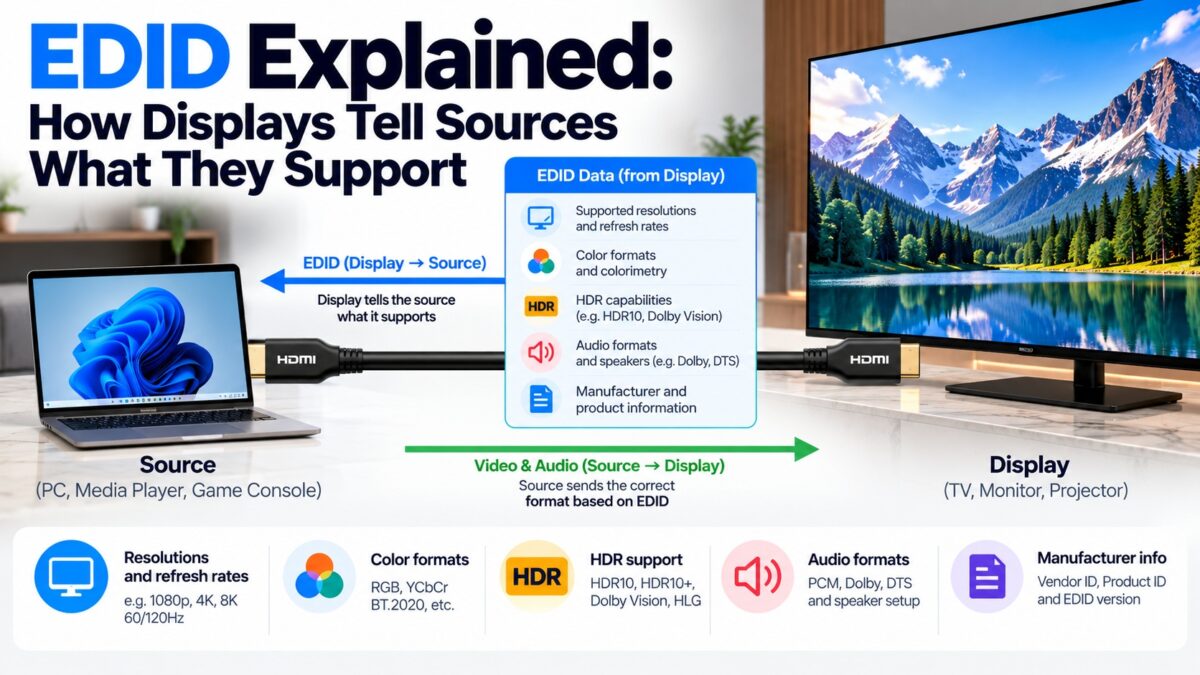
EDID (Extended Display Identification Data) is a small block of data stored in a display that describes what the display can do, such as its resolutions, refresh rates, audio formats and HDR support. When you connect a source to a display with HDMI, the source reads the EDID over the cable and uses it to choose a picture and sound format the display can handle. That is why a computer or console usually picks the right resolution without you telling it, and why a wrong or missing EDID leads to the wrong resolution, no sound or missing HDR.
What does an EDID contain?
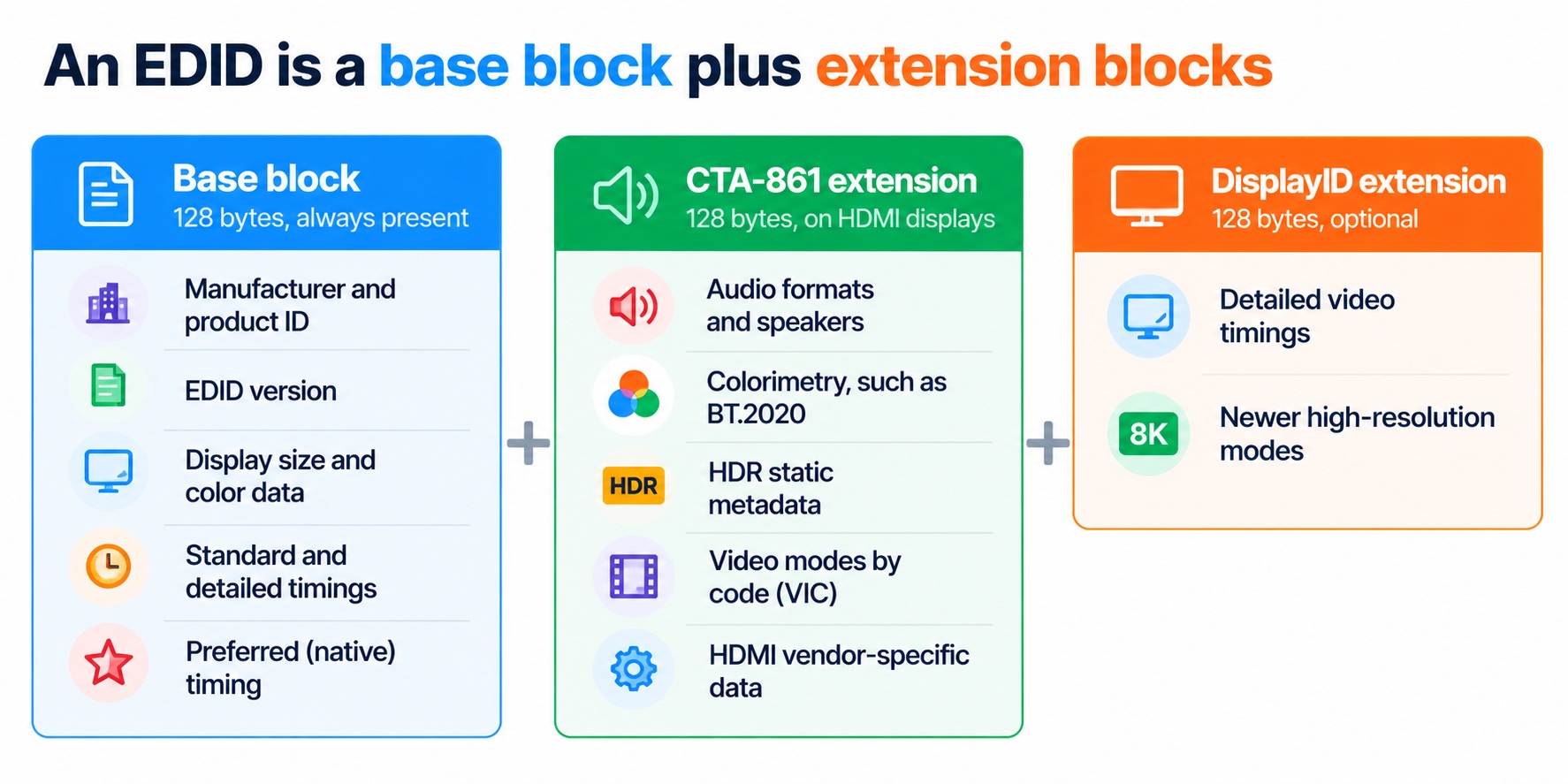
The core of an EDID is a 128-byte base block. The layout in the table follows the structure published by Extron in its guide to EDID.
| Bytes | Content | What it tells the source |
| 0 to 7 | Fixed header pattern | That this is a valid EDID |
| 8 to 9 | Manufacturer ID | Who made the display |
| 10 to 11 | Product ID code | Which model it is |
| 12 to 15 | Serial number | Which unit it is |
| 16 to 17 | Manufacture date | When it was made |
| 18 to 34 | EDID version, basic display parameters and color characteristics | Digital or analog, size, gamma, color space |
| 35 to 37 | Established timings | Common older video modes it supports |
| 38 to 53 | Standard timings | Further supported modes |
| 54 to 125 | Four detailed timing descriptors | Exact timings, with the first being the preferred (native) timing, plus text such as the product name |
| 126 | Extension flag | How many 128-byte extension blocks follow |
| 127 | Checksum | A check that the block was read correctly |
The first detailed timing is the display’s preferred timing, which usually corresponds to its native resolution and refresh rate.
What is in the extension blocks?
A base block can’t describe a modern HDMI display, so EDIDs add 128-byte extension blocks. HDMI displays use a CTA-861 extension, and many newer displays also include a DisplayID extension. Real EDID dumps from monitors and TVs show the following kinds of information:
- Audio: the audio formats the display accepts, with the maximum number of channels, supported sample rates and sample sizes, plus a speaker allocation block.
- Colorimetry: supported color spaces, such as BT.2020.
- HDR static metadata: which transfer functions are supported, such as SMPTE ST 2084 (the PQ curve used by HDR10), and the display’s luminance values.
- Video modes by code: a list of standard video format codes (VICs), for example VIC 97 for 3840 × 2160 at 60 Hz, and a YCbCr 4:2:0 capability map.
- HDMI-specific data: a vendor-specific data block for the HDMI features the display supports.
- DisplayID: a newer block with detailed video timing data for high-resolution and high-refresh modes.
How the EDID is organized
EDID structure · base block and extension blocks
The base block says which extension blocks follow.
How is EDID read over HDMI?
EDID travels over the DDC lines, an I²C bus on the SCL and SDA pins (15 and 16) of the HDMI connector, and the longer EDID layouts use the enhanced version, E-DDC. The source reads the EDID when it detects the display, which it learns through the Hot Plug Detect pin (19), and it can read it even when the display is off, because the source supplies +5 V on pin 18. Our how-HDMI-works guide shows where this fits in the start-up handshake.
After reading, the source:
- checks the data for the highest resolution and refresh rate the display supports,
- selects a video format and color format that fit, and
- selects an audio format the display accepts, then starts sending.
The same EDID also provides the address that CEC uses to build its device tree.
What problems can EDID cause?
Because the source decides everything from the EDID, a wrong EDID causes recognizable problems:
- The wrong resolution or refresh rate, because the source isn’t offered the mode you want.
- No sound, because the audio formats it reads don’t match what you want to send, such as a soundbar that doesn’t list a format.
- Missing HDR or other features, because the display doesn’t advertise them or a device in between doesn’t pass them on.
- A picture limited to the lowest common denominator, when a splitter, switch or receiver presents an EDID that doesn’t match your screen.
- A black screen after switching devices, when the source can’t read the EDID.
Devices in the middle of a chain are the usual cause. A receiver, switch or splitter reads the EDIDs from the displays behind it and presents its own. See our splitter, switch and matrix guide.
How do you fix EDID problems?
- Test with a direct connection. Connect the source straight to the display. If the problem disappears, a device in the middle is changing the EDID.
- Reconnect in order. Switch off the devices, connect them, and turn on the display first, then the source, so the source reads a fresh EDID.
- Try another cable and port. A damaged cable can interrupt the DDC lines.
- Update firmware on the display, receiver or switch.
- Use EDID management on switches or splitters that offer it, so the device presents an EDID that suits all screens.
- Use an EDID emulator if you need a source to see a display that isn’t there or to lock a specific EDID.
On a PC, the graphics driver can also override how an EDID is interpreted, but this is an advanced step that you should only use if you understand the effects.
What is an EDID emulator?
An EDID emulator is a small device or setting that stores an EDID and presents it to a source in place of the real display’s. It is used where the source needs to think a particular display is connected, such as in installations with switchers, capture equipment, or a headless computer without a monitor.
Common questions
What does EDID stand for?
Extended Display Identification Data.
How big is an EDID?
The base block is 128 bytes. Extension blocks add 128 bytes each.
Does EDID carry audio information?
Yes. The CTA-861 extension lists the audio formats, channel counts and sample rates a display accepts.
Is EDID the same as HDCP?
No. EDID describes what a display can do. HDCP is the copy-protection handshake. Both use the DDC lines.
Can I edit an EDID?
Yes, with the right tools, but a wrong EDID can cause a blank screen or an unsupported mode. Keep a copy of the original.
Why does my TV only show up as a generic monitor?
The source may have failed to read the display’s EDID, for example through a poor cable or a device in the middle, and fallen back to a basic mode.
3 comments