
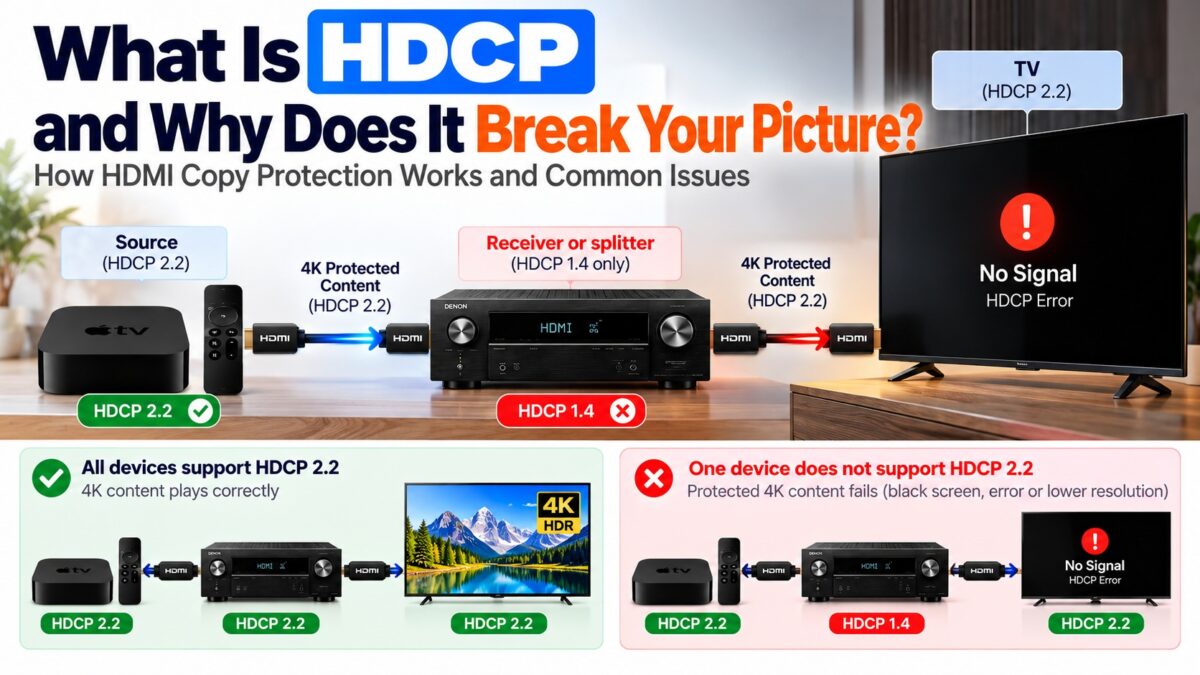
What Is HDCP?
HDCP (High-bandwidth Digital Content Protection) is a copy-protection system that encrypts protected video and audio as it travels over HDMI, so only authorized devices can display it. Before a protected stream plays, the source and the display check each other’s credentials. If every device in the chain passes, the picture appears. If one fails, you may see a black or pink screen, an “HDCP error”, or a drop from 4K to 1080p. HDCP is not part of the HDMI cable itself, but it runs over it, which is why it is so often mistaken for a cable or HDMI-version problem.
How does HDCP work?
HDCP protects a link in three steps: authentication, encryption and key renewal.
- Authentication. The source starts a handshake with the display. The two exchange keys to prove that both are licensed devices, and the source checks the display’s key against a revocation list of devices known to be compromised.
- Encryption. Once both pass, the source and display derive a session key and the video is encrypted with it for the whole connection.
- Key renewal. The keys are refreshed during the session.
This exchange runs over the DDC lines, the same pins that carry the display’s EDID. Unplugging and reconnecting a cable or switching an input starts the exchange again, which is why a switch can cause a brief black screen.
There are three kinds of device in an HDCP link:
- the source, which sends the video;
- the sink, which displays it;
- the repeater, a device in the middle such as an AV receiver, a splitter, a switch or a dock. A repeater has to pass authentication in both directions and report what is attached after it.
HDCP versions: 1.4, 2.2 and 2.3
| Version | Introduced | Typically used for | Notes |
| HDCP 1.4 | 2009 | Full HD (1080p) content | Usually paired with HDMI 1.3 and 1.4; its master key was leaked in 2010 |
| HDCP 2.2 | 2013 | 4K and HDR content | Uses RSA public-key authentication and 128-bit AES encryption; usually paired with HDMI 2.0 |
| HDCP 2.3 | 2018 | 4K and above | The current version, a hardened version of the 2.x handshake; relevant to the HDMI 2.1 era |
The key points are:
- HDCP 2.2 is not backward compatible with HDCP 1.4, so manufacturers build devices that support both.
- HDCP 2.2 cannot be added by a firmware update, because it needs dedicated hardware in the transmitter and receiver chips.
- Protected 4K content generally refuses to play over HDCP 1.4. The same source can send 1080p to an older TV and fail at 4K.
- HDCP 2.3 devices play content protected with 2.2, so the practical requirement is HDCP 2.2 or later.
The HDMI version and the HDCP version are separate. HDCP 1.4 roughly coincided with HDMI 1.3 and 1.4, and HDCP 2.2 arrived with HDMI 2.0, but some HDMI 2.0 devices may support only HDCP 1.4. That is why 4K TVs and projectors often print “HDCP 2.2” next to their HDMI ports.
Why does HDCP break your picture?
HDCP needs every device in the chain to support the version the content requires. The chain includes the source, any receiver, splitter or switch, the cable and the TV. If one link can’t do HDCP 2.2, the chain either drops to a lower resolution or shows a black or pink screen, or a content protection error.
The most common causes are:
- A repeater in the middle that doesn’t support HDCP 2.2. An older AV receiver, an HDMI splitter or a switch is the single most common cause of HDCP errors in a home setup.
- A display that supports only HDCP 1.4. A 4K source cannot send protected 4K to it.
- Docks, adapters, extenders and capture cards, which add more points where authentication can fail.
- A switch or reconnection that restarts the handshake and causes a short black screen.
A useful clue: if the desktop of a computer or an unprotected video works but a streaming app shows a black screen, HDCP is the likely cause, because the desktop doesn’t require the protected handshake. Not every black screen is an HDCP error, though. A cable that can’t carry the signal also gives a black screen.
How the HDCP chain fails
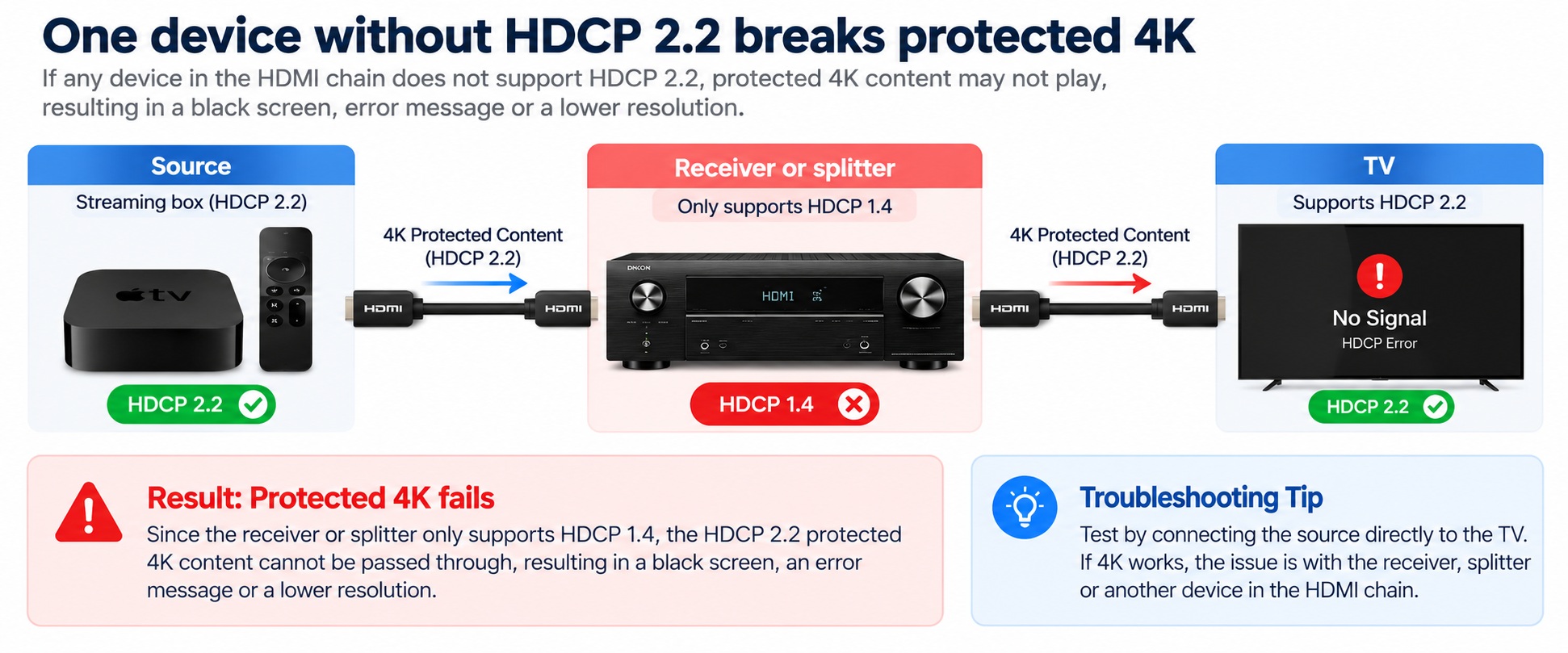
HDCP chain with one older device in the middle
The chain is only as capable as its weakest repeater.
How do you fix an HDCP error?
- Test the shortest chain. Connect the source straight to the TV. If protected 4K plays, the device in the middle is the weak link.
- Check the HDCP version on each device. Look for “HDCP 2.2” or “HDCP 2.3” at each HDMI input you use. Some TVs support HDCP 2.2 only on certain ports.
- Replace the weak link. Swap a receiver, splitter or switch that doesn’t support HDCP 2.2 for one that does.
- Skip the repeater for video. Connect the source to the TV directly and send the audio to your receiver or soundbar over eARC, so the receiver no longer sits in the video path.
- Power-cycle and reconnect. Turn everything off, unplug, wait briefly, and reconnect, so the handshake starts fresh.
- Try another cable and port. A damaged cable can also cause a failure.
There is no software fix for a device that lacks HDCP 2.2 hardware. If a display only supports HDCP 1.4, the options are a lower resolution or newer equipment.
Common questions
What does HDCP stand for?
High-bandwidth Digital Content Protection.
Do I need HDCP 2.2 for 4K?
For protected 4K content such as streaming apps and Ultra HD Blu-ray, yes. Every device in the chain needs to support HDCP 2.2 or later.
Is HDCP 2.3 better than 2.2?
For compatibility it makes no difference: HDCP 2.3 devices play 2.2-protected content, so 2.2 is the floor. 2.3 hardens the handshake.
Can a firmware update add HDCP 2.2?
No. HDCP 2.2 needs dedicated hardware in the chips.
Does the HDMI cable affect HDCP?
The cable has to carry the DDC lines where the handshake runs, but a normal certified cable does. HDCP errors are usually caused by a device in the chain, not the cable.
Why does my TV show a black screen only on Netflix or Blu-ray?
Streaming apps and discs require the protected handshake, while a computer desktop doesn’t. A failed handshake therefore blanks only protected content.
Can HDCP be bypassed?
HDCP is designed to stop unauthorized copying, and we don’t cover ways around it. If you have a legitimate setup that won’t display, fix the compatibility problem instead, using the steps above.
3 comments