What Is an HDMI Fiber Optic Cable?
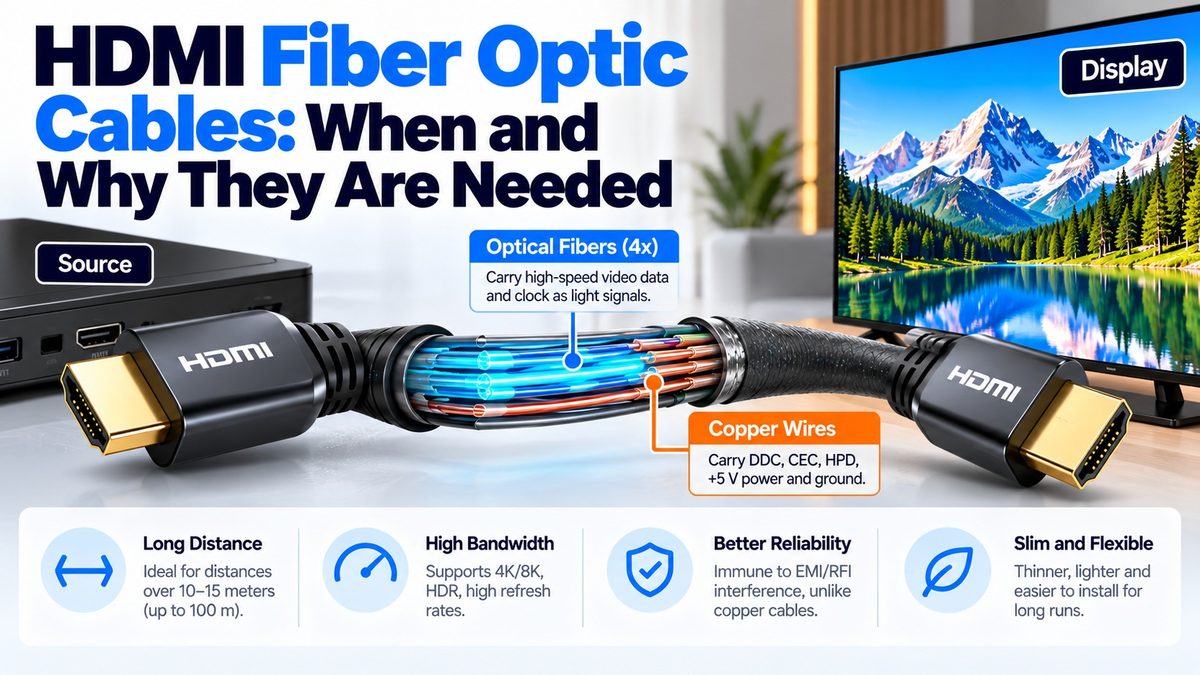
An HDMI fiber optic cable, usually sold as an active optical cable (AOC), carries the high-speed video signal as light through glass fibers instead of as electricity through copper, which lets it run much farther at full bandwidth. Small converters built into the connectors at each end turn the electrical HDMI signal into light and back again, so it plugs into ordinary HDMI ports. Optical cables are used for long runs, such as 30 meters up to 100 meters or more, for 4K at 60 Hz, 4K at 120 Hz and 8K, where a passive copper cable would lose too much signal. They are also thinner and lighter than copper, and they are not affected by electrical interference.
How does an HDMI fiber optic cable work?
Most HDMI optical cables are hybrids that use both fiber and copper.
- The high-speed signals go over fiber. HDMI’s four high-speed pairs (three data lanes and the clock, or four data lanes in FRL mode) are converted to light and carried by four optical fibers. At the sending end, a small laser, typically a VCSEL (vertical-cavity surface-emitting laser), produces the light. At the receiving end, a photodiode turns it back into an electrical signal. Typical products use multimode fiber and an 850 nm wavelength.
- The slow signals stay on copper. The low-speed lines, which are the DDC (EDID and HDCP), CEC, Hot Plug Detect, the utility pin, +5 V power and ground, run on thin copper wires in the same cable. These signals run at only 100 to 400 kbit/s, so they don’t need fiber.
- Power comes from the HDMI connection. The converters are powered through the +5 V pin of the HDMI connector, and one example cable uses only about 0.25 W. Some designs add an external power option.
How an HDMI hybrid optical cable carries the signals
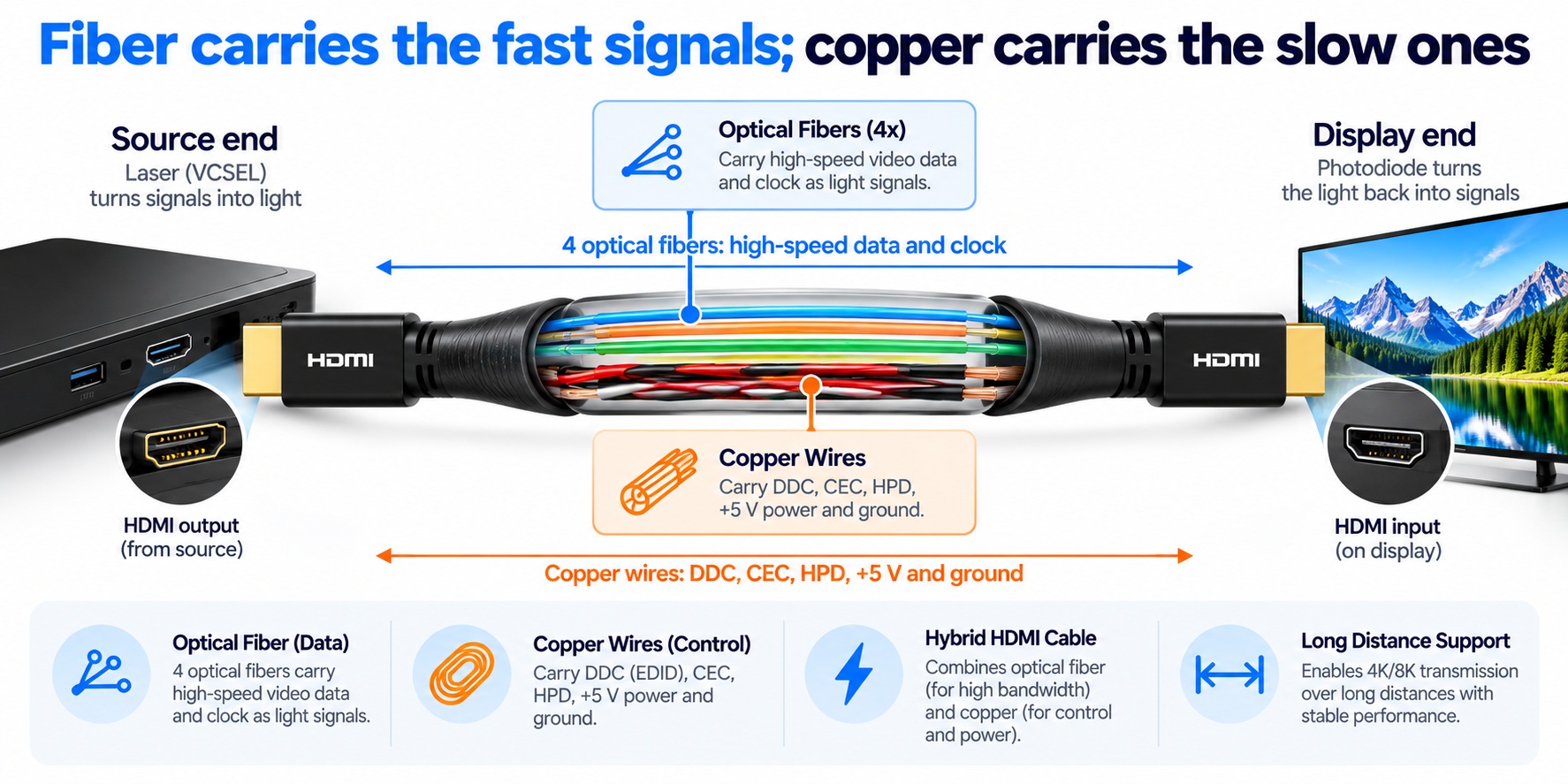
hybrid HDMI optical cable · fiber and copper paths
The fast signals travel one way as light, while the copper wires carry control and power both ways.
Why are HDMI optical cables directional?
The high-speed data travels in one direction only, from the laser at the source end to the photodiode at the display end. The cable therefore has a marked Source end and a Display end, and it has to be connected the right way round. Plugging it in backward is the most common reason an optical cable doesn’t work. Because of this, makers advise you to test the connection before you run the cable inside a wall.
HDMI fiber optic vs. copper cables
| Fiber optic (AOC) | Passive copper | |
| Typical length at full bandwidth | About 30 m to 100 m or more | A few meters at 48 Gbps |
| Electrical interference | Fiber is not affected | Susceptible |
| Thickness and weight | Thinner and lighter; one maker says 10 m of AOC weighs under 300 g, against about 1 kg for 5 m of copper | Thicker and heavier |
| Direction | Directional: marked source and display ends | Works either way |
| Power | Draws a small amount from the HDMI connection | None |
| Bend radius | Varies by product, from a few millimeters to about 50 mm, so check it | Varies |
| Cost | Higher | Lower |
When should you choose a fiber optic HDMI cable?
- Long runs. Beyond roughly 10 meters at 4K and 60 Hz, or a few meters at 48 Gbps, where copper and even active copper cables run out of reach.
- High-bandwidth modes over distance, such as 4K at 120 Hz or 8K to a projector across a room.
- Runs inside walls and conduit, because the cable is thin and light. Some models have detachable connector heads to make pulling easier.
- Electrically noisy places, such as near motors or heavy power cabling.
- Fire-code requirements, since plenum-rated optical cables are available.
For short runs of a few meters, a certified passive copper cable is cheaper and simpler, so you don’t need fiber.
Are HDMI optical cables certified?
Yes. Ultra High Speed cables, which include optical ones, go through the HDMI Cable Certification Program, and each model and length must be tested. The first Ultra High Speed active optical cable was certified in December 2020. Look for the official cable name and the certification label, as explained in our cable types guide. Optical cables are also sold for 18 Gbps, for 4K at 60 Hz in full 4:4:4 color.
How do you install an HDMI optical cable?
- Check the markings. Connect the Source end to the source (console, player or receiver output) and the Display end to the TV or projector.
- Test before you hide it. Connect everything and confirm the picture and your target resolution before you pull the cable through a wall or ceiling.
- Respect the bend radius. Don’t kink the cable or bend it tighter than the manufacturer specifies, and don’t crush it, because the glass fibers can be damaged.
- Don’t pull on the connectors. Use the pulling method recommended by the maker, such as detachable heads, if the cable has them.
- Supply power if needed. If the cable has an external power input, use it when the device’s HDMI port doesn’t provide enough power.
Common questions
Is a fiber optic HDMI cable better than copper?
For long runs and high bandwidth, yes. For short runs, a good copper cable is just as good and costs less.
How long can an optical HDMI cable be?
Typical products run from about 30 meters to 100 meters or more, and some are sold for hundreds of feet.
Why is my optical HDMI cable not working?
The usual cause is that it is connected backward. Check that the Source end goes to the source and the Display end goes to the display, then check the power and the bend radius.
Does an optical HDMI cable need power?
It takes a small amount from the HDMI connection, so you don’t normally need an external power supply, although some models offer one.
Does fiber change the picture quality?
No. The cable carries the same signal, uncompressed, so the picture and sound are unchanged.
Do optical HDMI cables work with ARC and CEC?
Many do, because the copper wires carry the low-speed signals, but check the product’s specifications for ARC, eARC, CEC and HDCP.
1 comment