How Does DisplayPort Work?
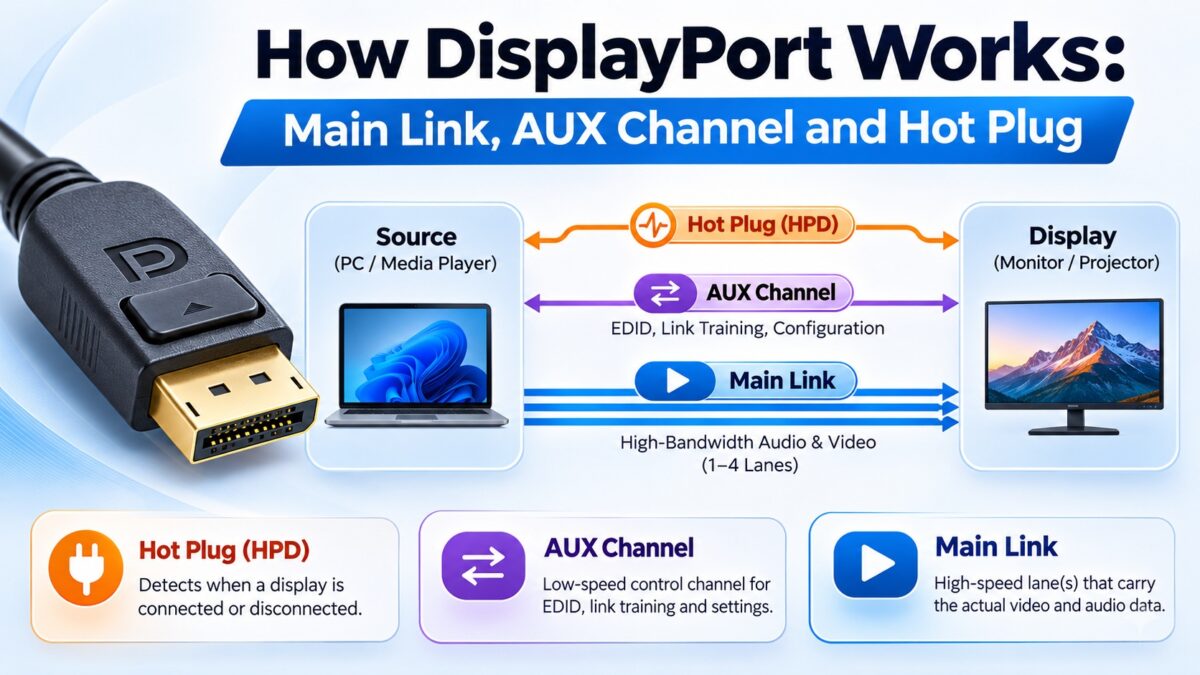
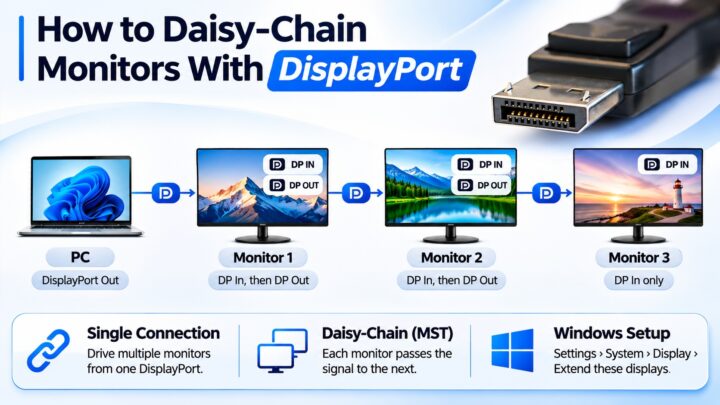
DisplayPort sends video and audio as small data packets over one to four high-speed lanes called the main link, while a slow two-way AUX channel handles setup and a Hot Plug Detect line tells the source when a display is connected. There is no separate clock wire: the clock is embedded in the data and recovered by the receiver. When you plug in a monitor, the source reads the display’s capabilities over the AUX channel and then runs a short test called link training to agree on how many lanes to use and how fast to run them. Only after that do the picture and the sound start. Because the data travels in packets, the same cable can also carry several streams, which is how daisy-chaining works.
What are the three channels of DisplayPort?
Electrically, DisplayPort is an AC-coupled differential interface that resembles the physical layer of PCI Express. It has three channels:
- The main link, a set of one-way serial data lanes that carry the video and audio from the source to the display.
- The AUX channel, a slow, two-way “side channel” for link management, status, configuration and control.
- Hot Plug Detect (HPD), a single line that the display uses to signal that it is connected, and later to report changes.
Older interfaces such as DVI used a separate pair of wires for the clock. In DisplayPort, the clock is embedded in the data pairs and extracted from the encoded data stream, which saves wires and helps reduce electromagnetic interference. Our DisplayPort pinout guide shows which pins each channel uses.
How does the main link send video and audio?
The main link uses a micro-packet architecture. Instead of a continuous stream of pixels with a separate clock, as in older interfaces, it sends the data as small packets, which means the same link can carry:
- the video stream,
- secondary data such as audio and information frames, and
- additional streams, which is what lets one cable drive several displays.
The link runs on one, two or four lanes, and each lane runs at a fixed speed agreed during link training. In DisplayPort 1.x, data is encoded with 8b/10b coding and scrambled before it is sent, which spreads the signal’s energy and reduces interference. The result is that all of the traffic to and from a monitor, including audio and data for a built-in USB hub, can share a single cable.
What does the AUX channel do?
The AUX channel is the control path of DisplayPort. It is a bidirectional, self-clocking channel that uses Manchester coding and runs at about 1 Mbps in its basic mode. The source uses it to:
- read the display’s EDID, the list of resolutions and features the display supports, which is carried over the AUX channel using I²C-over-AUX transactions;
- read and write the DPCD (DisplayPort Configuration Data), a set of registers in the display that describe its link capabilities, including its support for compression, and that hold its status;
- configure the link and run link training.
What does Hot Plug Detect do?
HPD is the display’s way of getting the source’s attention. When the display is connected and ready, it raises the HPD line, and the source reacts by reading the display’s capabilities and setting up the link. After link training, the display uses the same line to signal changes. For example, a short pulse on HPD tells the source that something has happened, such as a loss of synchronization, so the source can check the display and retrain the link if needed.
What happens when you connect a DisplayPort monitor?
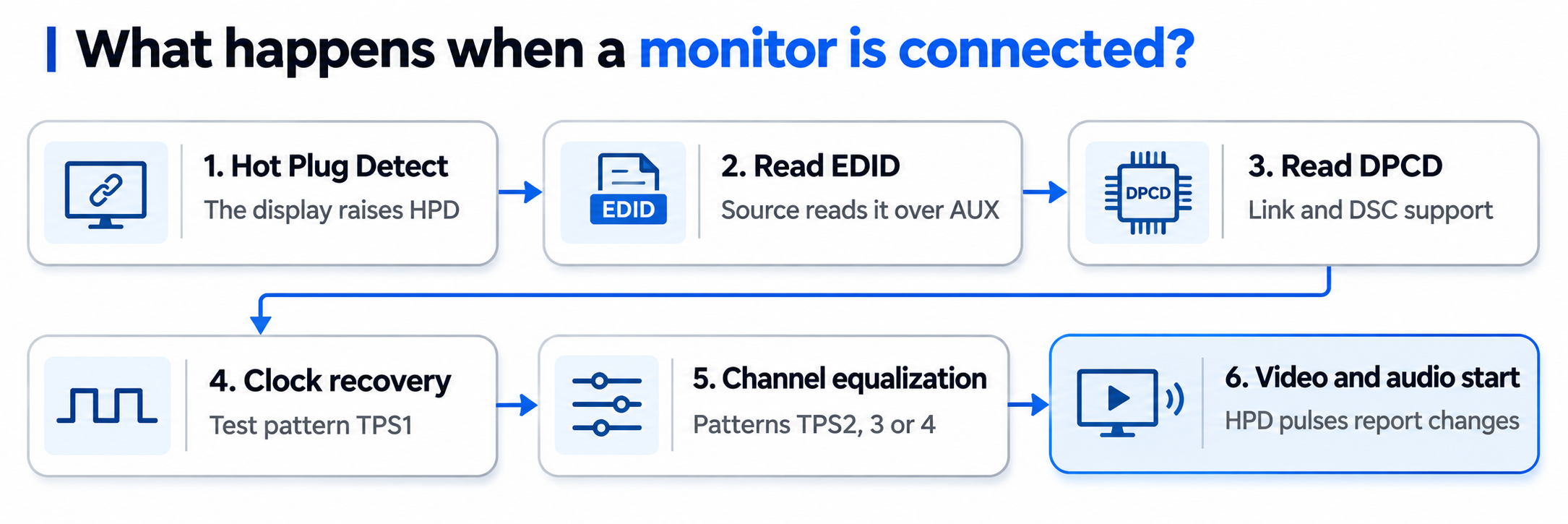
DisplayPort start-up sequence
Steps 1 to 3 gather information, and steps 4 and 5 set up the link before the picture starts.
What is DisplayPort link training?
Link training sets the physical link parameters: how many lanes to use, how fast to run them, and how much to boost the signal to overcome loss in the cable. It has two parts:
- Clock recovery. The source sends a simple test pattern (TPS1) on the lanes, and the display locks its receiver to it. The display sets a “clock recovery done” bit for each lane in its DPCD registers.
- Channel equalization. The source then sends a more demanding pattern (TPS2, TPS3 or TPS4, depending on the version) so the receiver can align the lanes and compensate for cable loss. When every lane reports success, training is complete.
If training fails at one speed, the source can try fewer lanes or a lower speed, which is why a weak cable may produce a lower resolution or refresh rate instead of no picture. Our link training guide explains this in more detail.
How is this different from HDMI?
| DisplayPort | HDMI (TMDS) | |
| Clock | Embedded in the data | Separate clock pair |
| Data format | Micro-packets | Continuous video with data islands |
| Control path | AUX channel (EDID, DPCD, link training) | DDC (I²C) and CEC |
| Lanes | 1, 2 or 4, chosen by link training | 3 data lanes plus a clock |
| Several displays | Yes, with MST | No |
Our guide to how HDMI works explains the TMDS side.
Common questions
What is the main link in DisplayPort?
The set of one-way high-speed lanes that carry video and audio from the source to the display.
What does the DisplayPort AUX channel do?
It carries control and setup data in both directions at a low speed: EDID, DPCD reads and writes, and link training.
Does DisplayPort have a separate clock wire?
No. The clock is embedded in the data and recovered by the receiver.
What is DPCD?
DisplayPort Configuration Data: registers inside the display that describe what it can do and hold its status.
What is HPD on DisplayPort?
Hot Plug Detect, a line the display raises to say that it is connected, and pulses later to report changes.
Why does DisplayPort sometimes run at a lower resolution than expected?
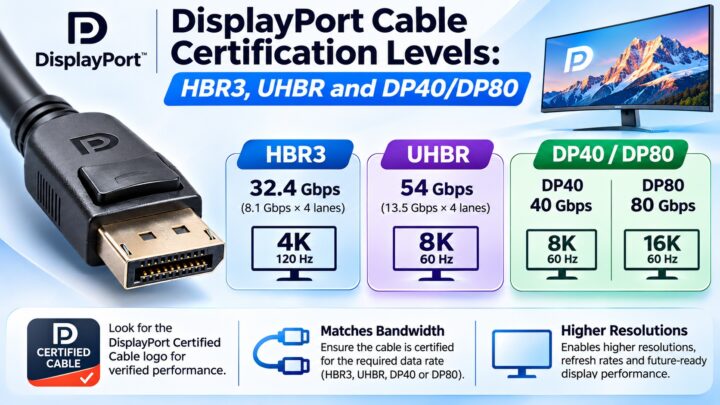
Link training may have settled on fewer lanes or a lower speed because of the cable or a device in the chain. Try a certified cable.
Does DisplayPort send audio on separate wires?
No. Audio is sent as packets on the main link along with the video.
Keep learning
- What Is DisplayPort? A Beginner’s Guide (CON-DisplayPort-001)
- DisplayPort Pinout: All 20 Pins Explained (CON-DisplayPort-004)
- DisplayPort Link Training Explained (CON-DisplayPort-015)
- What Is DisplayPort Multi-Stream Transport (MST)? (CON-DisplayPort-007)
- How HDMI Works: TMDS and Data Channels (CON-HDMI-009)
4 comments