How Long Can a DisplayPort Cable Be?
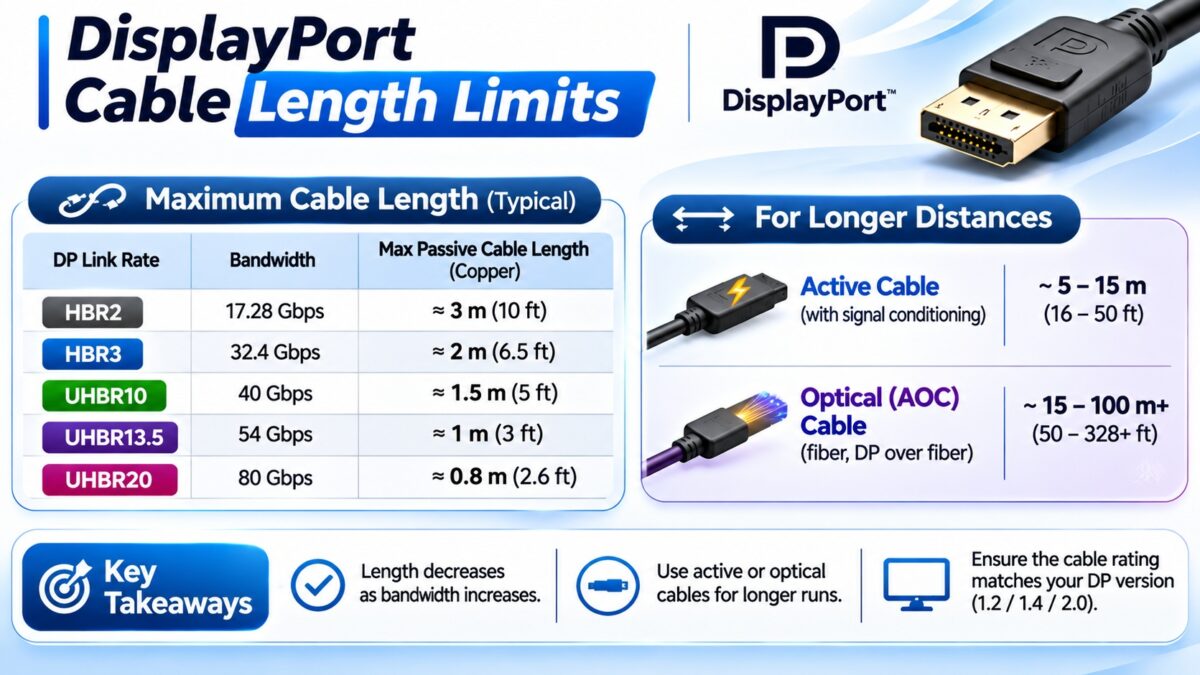
There is no single official maximum length for a DisplayPort cable: the practical limit depends on how fast the link runs, with passive copper cables typically reliable up to about 1 to 3 meters for the fastest modes and several meters for slower ones, while active and optical cables reach 15 meters and more. Higher link rates lose more signal in the cable, so a cable that is fine for 1080p can fail for 4K at 144 Hz or for DisplayPort 2.1’s UHBR modes. VESA’s cable certifications give the clearest guidance for the newest speeds: about 1 meter for a passive DP80 cable, about 2 meters for a passive DP54 cable, and about 3 meters for an active DP80LL cable. Sources disagree on exact numbers, so treat all lengths as rough guidance.
DisplayPort cable length at a glance
The lengths below combine VESA’s published targets with figures from cable makers and guides. They are not guarantees.
| Cable and use | Typical length | Notes |
| Passive, 1080p or 1440p up to 144 Hz | About 3 to 4.6 m (10 to 15 ft) | One maker sells certified DisplayPort 1.2 cables of 4.6 m for 4K at 60 Hz |
| Passive, 4K at 120 or 144 Hz (HBR3) | About 1 to 2 m (3 to 6 ft) for reliable results | Certified passive DisplayPort 1.4 cables of 5 m are sold, but short, good cables are safest |
| Passive DP54 (UHBR13.5) | About 2 m | VESA target |
| Passive DP80 (UHBR20) | About 1 m | VESA target; one source says up to 2 m with DisplayPort 2.1b |
| Active DP80LL (UHBR20) | About 3 m | VESA target; uses a link redriver |
| Active copper (DisplayPort 1.4) | Up to about 15 m (50 ft) | Certified examples carry 8K at 60 Hz and 4K at 120 Hz |
| Active optical (AOC) | About 15 m to 30 m or more | Makers claim up to 100 m for some products |
How long a DisplayPort cable can be
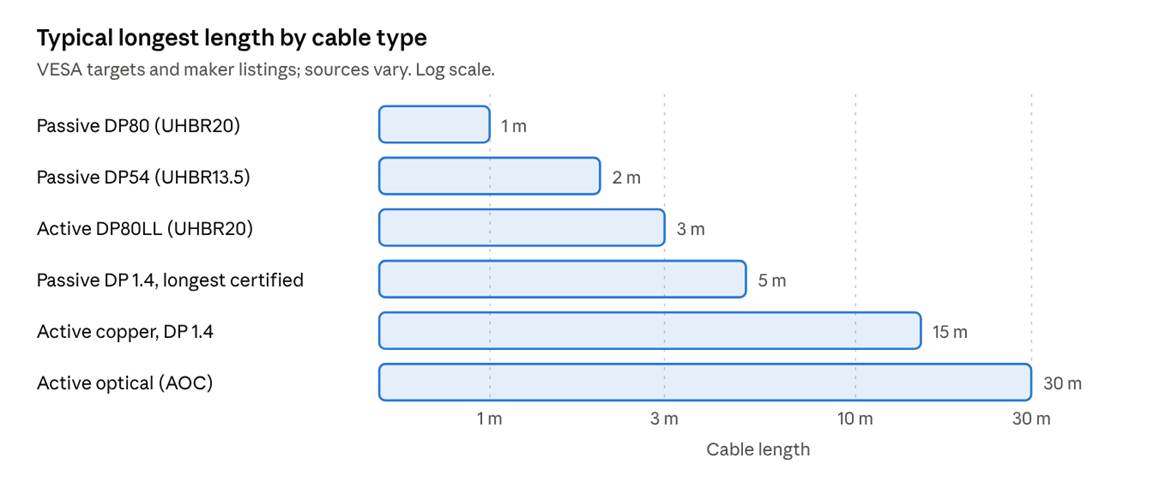
typical longest DisplayPort cable length by type
The faster the link rate, the shorter a passive cable can be.
What is an active DisplayPort cable?
An active cable has electronics in the connector or cable that boost or equalize the signal, so it can run farther than a passive cable. Active copper DisplayPort cables are sold at lengths such as 10 and 15 meters, with certified DisplayPort 1.4 examples handling 8K at 60 Hz and 4K at 120 Hz. One maker describes a self-powered signal booster that needs no external power, and active cables are usually directional, with a connector marked for the source and one for the display.
What is an active optical DisplayPort cable?
An active optical cable (AOC) converts the signal to light and sends it through fiber, with converters at each end, so it can span much longer distances. Fiber DisplayPort cables reach 30 meters or more, and the 15 meter AOC cables sold by StarTech and others are bus powered, with no external supply. They are the usual choice for full-bandwidth modes over long runs and for runs through walls. Our HDMI guide to fiber optic cables explains how the technology works in more detail.
What happens if a DisplayPort cable is too long?
- Flicker or black screens, as the signal margin runs out.
- A silent drop in link rate. With a long or cheap passive cable, the graphics card may fall back from HBR3 to HBR2 during link training, which caps you at a lower resolution or refresh rate, for example 1440p at 120 Hz or 4K at 60 Hz, without any error message.
- Dropouts or no signal at the highest modes.
Our link training guide explains why the link rate can drop.
How do you choose the right length?
- Measure the route, not the straight line, and add about 10 cm at each end for a stress-free bend radius.
- Decide the fastest mode you will use. The faster the mode, the shorter the passive limit.
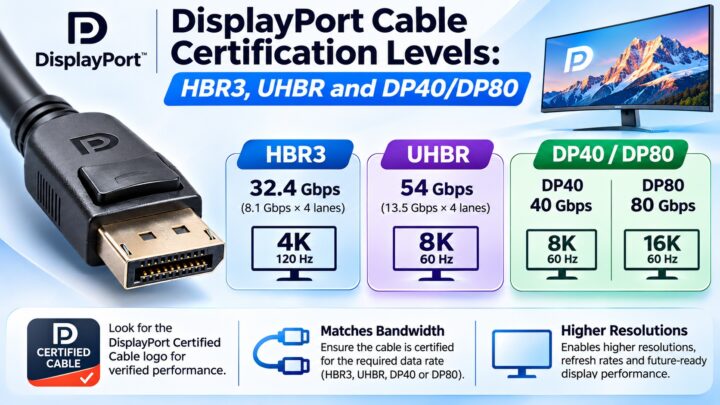
- Buy a certified cable with the VESA logo for the link rate you need. Our certification guide explains DP8K, DP54, DP80 and DP80LL.
- Choose active or optical when the run is more than a few meters, or when you need the full bandwidth of a high mode over a longer run.
- Test before hiding the cable. Connect it in the open, confirm the resolution and refresh rate, and only then route it through a wall.
Common questions
What is the maximum length of a DisplayPort cable?
There is no official maximum. Passive copper cables are reliable over a few meters at high speeds, and active and optical cables reach 15 meters and beyond.
How long can a DisplayPort cable be for 4K 144 Hz?
About 1 to 2 meters is the safe range for a passive cable, according to several sources. Longer runs need an active or optical cable.
Can I use a 5 meter DisplayPort cable for gaming?
It is risky for the fastest modes. A 5 meter passive cable may force the link down from HBR3 to HBR2. A certified or active cable is more reliable.
Is an optical DisplayPort cable better than copper?
For long runs and high bandwidth, yes. For short desk runs, a certified passive cable is cheaper and works fine.
Does a longer DisplayPort cable reduce image quality?
Not gradually. The signal either arrives intact or shows problems such as flicker, dropouts and a lower mode.
Do DisplayPort and HDMI have the same length limits?
They are similar in practice. Both depend on bandwidth, and both use active or optical cables for long runs. See our HDMI cable length guide.
Keep learning
- DisplayPort Cable Certification Levels: HBR3, UHBR and DP40/DP80 (CON-DisplayPort-010)
- DisplayPort Link Training Explained (CON-DisplayPort-015)
- How DisplayPort Works: Main Link, AUX Channel and Hot Plug (CON-DisplayPort-006)
- HDMI Cable Length Limits and When You Need Active Cables (CON-HDMI-017)
- HDMI Fiber Optic Cables: When and Why They Are Needed (CON-HDMI-022)