
What Is the Difference Between an HDMI Splitter, Switch and Matrix?
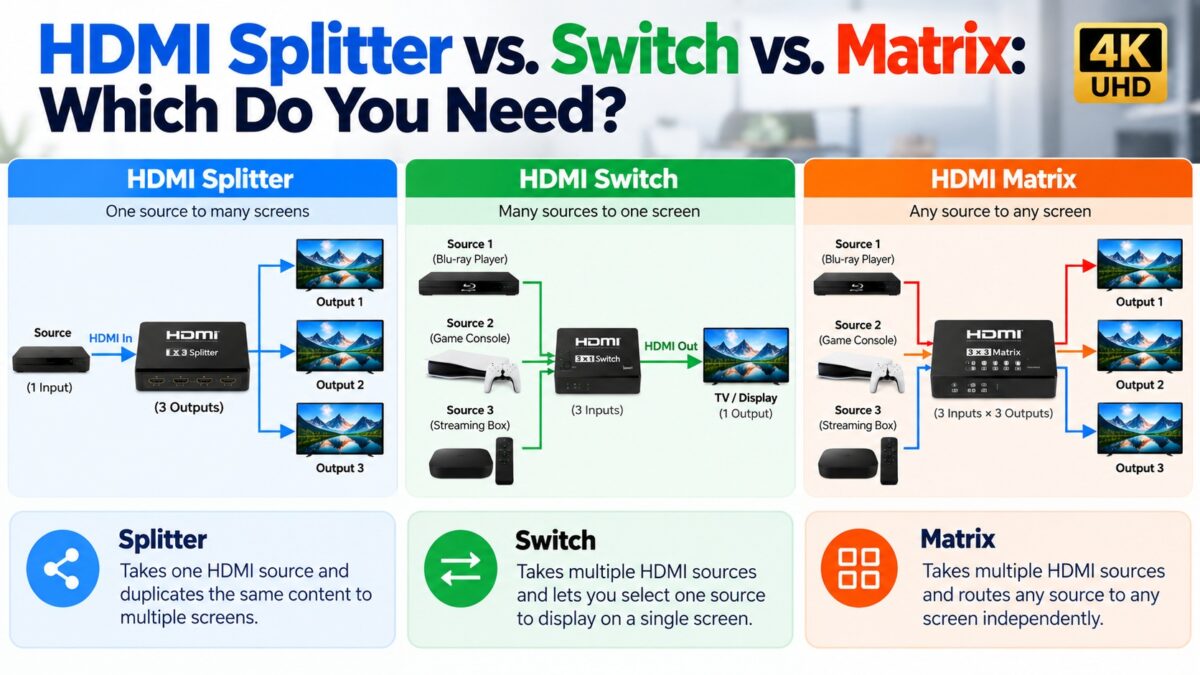
An HDMI splitter copies one source to several screens, an HDMI switch lets several sources share one screen, and an HDMI matrix lets any of several sources go to any of several screens. The names say how many inputs and outputs each has: a splitter has one input and several outputs, a switch has several inputs and one output, and a matrix has several of both. If you only need to share one cable box between two TVs, you want a splitter. If your TV has run out of HDMI ports, you want a switch. If you manage several sources and several displays, such as a multi-room setup, you want a matrix.
HDMI splitter vs. switch vs. matrix at a glance
| Splitter | Switch | Matrix | |
| Inputs and outputs | 1 in, several out | Several in, 1 out | Several in, several out |
| What it does | Sends the same signal to every output | Lets you choose which source reaches the screen | Routes any input to any output |
| Typical notation | 1×2, 1×4 | 3×1, 4×1 | 4×4, 8×8 |
| Typical use | One source on several TVs | More sources than TV ports | Multi-room or multi-display systems |
| Sources shown at once | One, copied to every screen | One at a time | Different sources on different screens |
The first number is the inputs and the second is the outputs, so a 3×1 switch has three inputs and one output.
How the three devices connect
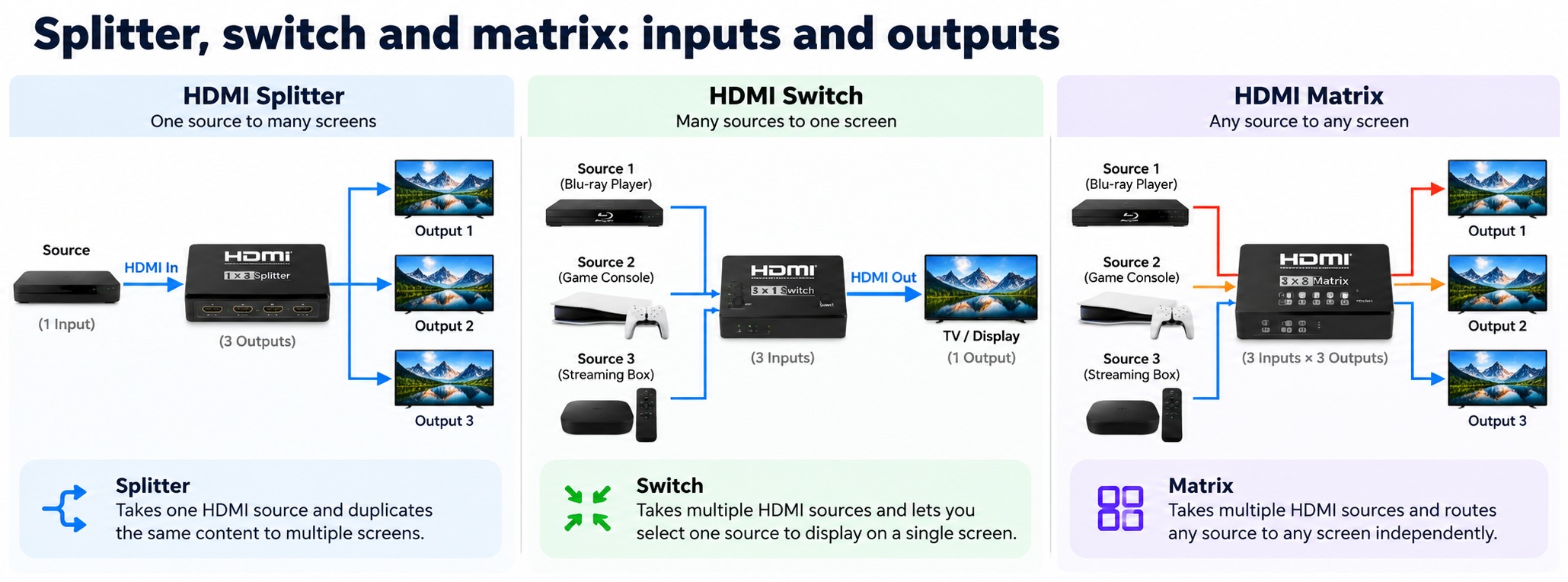
HDMI splitter, switch and matrix · inputs and outputs
The numbers show a 1×3 splitter, a 3×1 switch and a 3×3 matrix.
How does an HDMI splitter work?
A splitter takes one HDMI input and sends it to several outputs at the same time. Every screen shows the same picture. It suits a case such as a single cable box feeding several TVs in a home or a bar.
There are two kinds:
- Passive splitters take their power from the HDMI connection. They can work for simple setups, but they are less reliable for higher-quality signals such as 4K, and one guide notes that a passive splitter is likely to introduce latency.
- Active splitters have their own power supply, which helps prevent dropouts. They are generally the better choice for 4K, for longer cables and for more than two outputs. Guides disagree on how often a passive one is enough, so if you are unsure, choose active.
A splitter also has to handle the HDMI handshake, which includes the HDCP and EDID checks between the source and each screen.
How does an HDMI switch work?
A switch has several inputs and one output. You plug each source, such as a console, a Blu-ray player and a streaming box, into a numbered input, and the output goes to one TV port. The TV sees a single input, and the switch decides which source reaches the screen. Only one source is shown at a time, and many switches change source with a button or a remote.
A switch is the answer when your TV has fewer HDMI ports than you have devices, so you don’t have to unplug cables.
What is an HDMI matrix?
A matrix is a combination of a splitter and a switch. It has several inputs and several outputs, and you decide which input goes to which output. You can also send one input to two or more outputs. With the right model you can change the routing by remote control.
A matrix is the right choice when you manage several sources and several screens at once, for example in a conference room, a bar or a multi-room home system. It costs more and is more complex than the other two, so it makes little sense for a simple living room.
Which one do you need?
- One source, more than one screen showing the same thing: a splitter.
- More sources than TV ports: a switch.
- Several sources and several screens, with different content on each: a matrix.
- A simple home theater with a receiver: often none of them. An AV receiver with several HDMI inputs already works as a switch.
What should you check before buying?
- The HDMI standard. The device should match your equipment. Older switches may be limited to 1080p, while 4K and HDR setups need HDMI 2.0 or higher. For 4K at 120 Hz with VRR, ALLM and dynamic HDR, look for an HDMI 2.1 model.
- HDCP support. For 4K, make sure the device handles HDCP 2.2, because a device that doesn’t will break protected content.
- EDID management. This helps the source choose a format that all your screens can show.
- Active power. Choose a model with its own power supply for 4K or long cable runs.
- Audio formats. Splitters support specific audio formats, so check that yours supports the ones you use.
Why does my splitter lower the picture quality or show a black screen?
The usual cause is the HDMI handshake. A source reads the EDID, which lists what a screen supports, and chooses a format. With a splitter there are several screens, so the splitter often settles on what the weakest one can show. If one screen supports 1080p and another supports 4K, the splitter will often downscale the signal for every output.
Other common causes are:
- HDCP. A splitter or switch that isn’t HDCP 2.2 compliant, or that downgrades the HDCP version, can break the chain and blank protected content.
- A passive device that can’t deliver enough power or signal for 4K.
- A source that is not the right input. Check that the switch is set to the source you want.
If you see a black screen only with protected content such as streaming apps, see our HDCP guide.
Common questions
Can I use an HDMI splitter to show different things on two TVs?
No. A splitter sends the same signal to every output. To show different sources on different screens you need a matrix.
Can I use a splitter backward as a switch?
Usually not. Splitters and switches are built for one direction, and the electronics differ. Buy the right device for the job.
Is an active splitter better than a passive one?
For 4K, longer cables and more than two outputs, yes, because it has its own power. For simple short setups a passive one may work, but it is less reliable.
Will a splitter reduce picture quality?
A good splitter does not, but it can limit the signal to what the weakest connected screen supports.
Do I need an HDMI switch or just use the TV ports?
If your TV has enough ports, you don’t need a switch. A switch helps when you have more devices than ports.
What does 4×1 mean on an HDMI switch?
Four inputs and one output.
2 comments