How Do HDMI ARC and eARC Work?
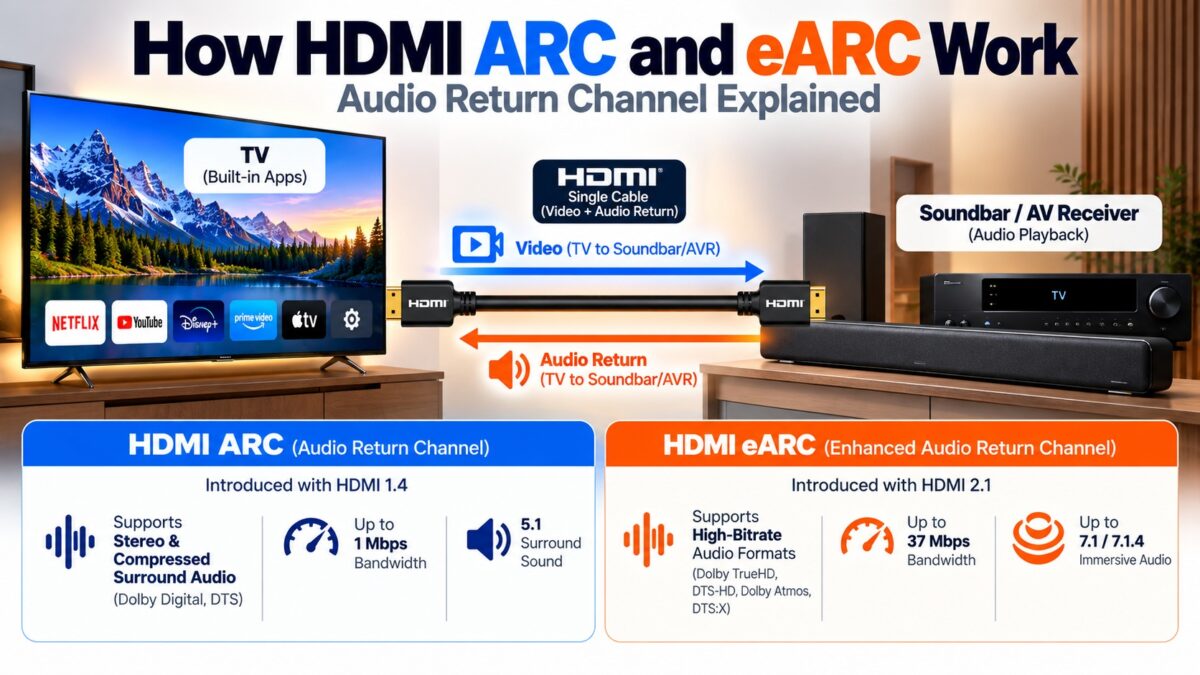
ARC (Audio Return Channel) and eARC (enhanced ARC) send audio from a TV back to a soundbar or AV receiver over the same HDMI cable that normally carries signals toward the TV. ARC, introduced with HDMI 1.4, carries about 1 Mbps and relies on HDMI-CEC to find and control the audio device. eARC, introduced with HDMI 2.1, uses the two pins that were previously used for the HDMI Ethernet Channel as a dedicated differential pair, carries up to 37 Mbps, and has its own discovery and control channel, which makes it far more reliable. That extra bandwidth is what allows lossless and object-based audio such as Dolby TrueHD and Dolby Atmos to travel from the TV to the speakers.
Why do ARC and eARC exist?
A modern TV is also a source: streaming apps and its built-in tuner produce audio inside the TV. To hear that on a soundbar or receiver, the sound needs a way out of the TV. Before ARC, that meant a second cable, usually optical (TOSLINK), which tops out at roughly 384 kbit/s and cannot carry the highest-quality formats.
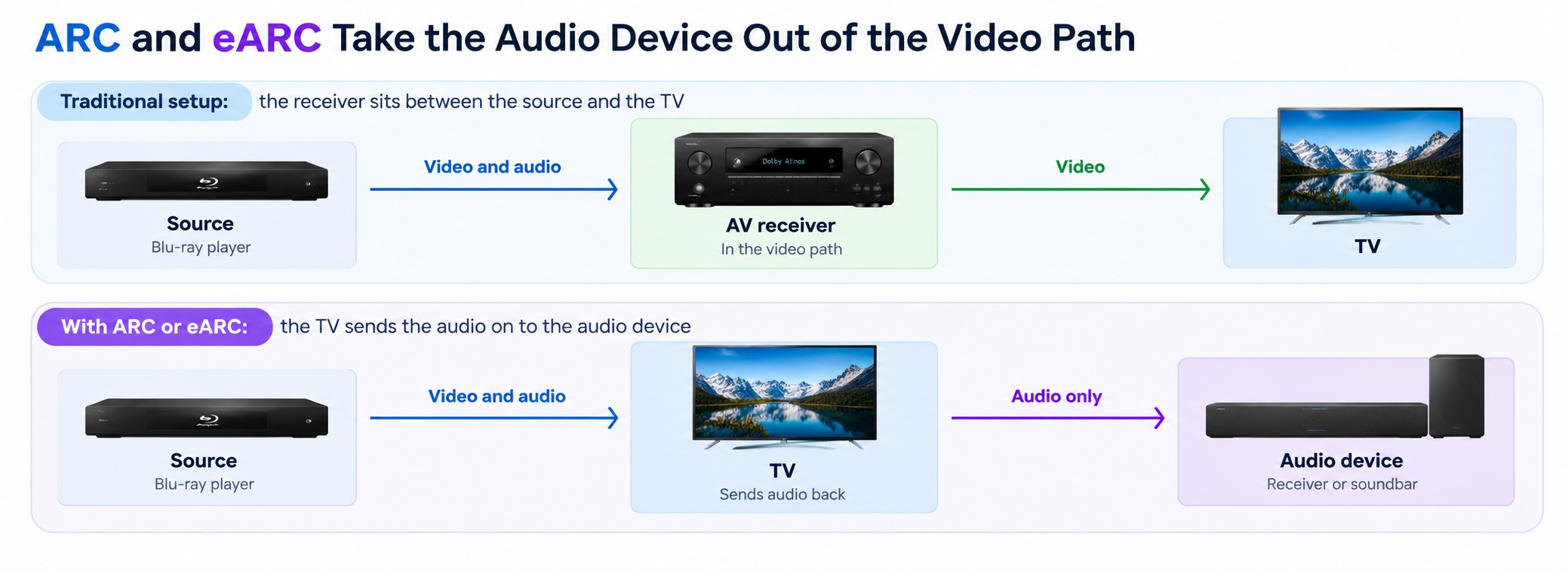
There is a second reason. In a traditional setup, a source such as a Blu-ray player connects to the AV receiver, and the receiver passes the video on to the TV. That puts the receiver in the video path, so it has to support every new video feature. With eARC, you connect the source to the TV and the TV sends an audio-only signal to the receiver, which takes the audio device out of the video path.
How does HDMI ARC work?
ARC uses one HDMI cable between the TV’s ARC port and the audio device’s HDMI OUT (ARC) port. It reuses the pins on the 19-pin connector that HDMI 1.4 set aside for the optional ARC and Ethernet channel, so no extra wires are needed. The audio flows in the opposite direction from the video on the same cable.
ARC relies on HDMI-CEC for several jobs: finding the audio device, learning what it can play, letting the TV remote control the volume, and turning the audio device on with the TV. Because CEC was not implemented consistently by all manufacturers, ARC could discover devices unreliably, which is behind many of the “no sound” problems. Lip sync correction is optional on ARC.
ARC carries about 1 Mbps. That is enough for stereo PCM and compressed surround such as Dolby Digital and DTS, plus Dolby Atmos in its lossy Dolby Digital Plus form, but not for uncompressed multichannel or lossless audio.
How does HDMI eARC work?
eARC keeps the same connector, but it uses pins 14 and 19 (plus the ground on pin 17) as a dedicated differential pair for high-performance audio. This gives it a link of its own, a “system within a system”.
Several things change compared with ARC:
- Higher bandwidth. Up to 37 Mbps, enough for up to 32 channels of audio at 24-bit and 192 kHz, and for lossless and object-based formats including Dolby TrueHD, DTS-HD Master Audio, Dolby Atmos and DTS:X.
- Its own discovery and control. Instead of CEC, the devices find each other and exchange the audio device’s capabilities, including its audio EDID, over a dedicated eARC data channel. This makes connections between different brands more reliable.
- Mandatory lip sync. The audio device reports its delay so the TV can keep sound and picture aligned.
- A heartbeat signal. The audio device sends a continuous heartbeat to the TV. The TV uses it to mute its own speakers while the audio device is connected, and to un-mute them if the signal is lost.
- Independence from the HDMI video version. The eARC pair operates independently of the HDMI version in use for video.
- Fallback to ARC. If one device lacks eARC, the connection falls back to ARC.
eARC still uses CEC for the user-facing features such as volume control and powering the audio device on and off.
ARC vs. eARC: the differences
| Feature | Optical (TOSLINK) | HDMI ARC | HDMI eARC |
| Maximum audio bandwidth | About 384 kbit/s | About 1 Mbit/s | 37 Mbit/s |
| Introduced | Not applicable | HDMI 1.4 (2009) | HDMI 2.1 (2017) |
| Link discovery | None | CEC | eARC data channel |
| Capability discovery (audio EDID) | None | CEC | eARC data channel |
| Lip sync | No | Optional | Mandatory |
| Stereo PCM | Yes | Yes | Yes |
| Compressed 5.1 | Very limited | Yes | Yes |
| Uncompressed multichannel PCM | No | No | Yes |
| Lossless and object-based formats (TrueHD, DTS-HD, Atmos, DTS:X) | No | No (Atmos only in lossy form) | Yes |
| Fallback | Not applicable | Not applicable | Falls back to ARC |
How the audio travels
What do you need for eARC?
- A TV and an audio device that both support eARC. If either one does not, the connection falls back to ARC.
- Matching ports. Connect the cable to the TV’s port labeled eARC (or ARC) and the audio device’s HDMI OUT (eARC/ARC) port.
- CEC turned on for the remote control and power features.
- A suitable cable. Advice differs. A report of an HDMI Forum FAQ says a regular High Speed cable with Ethernet is enough, while some manufacturers’ guides recommend a certified Ultra High Speed cable. If you have trouble, try a certified Ultra High Speed cable.
Note that eARC support does not require every other HDMI 2.1 video feature on the TV. Check the port label.
Should you use ARC or eARC?
- Use eARC when both devices support it, particularly if you want lossless soundtracks from Blu-ray, full-quality Dolby Atmos, or more reliable connections.
- Use ARC when one device lacks eARC. It handles stereo and compressed surround, including streaming Atmos, which is what most services deliver.
- Use optical only if neither device has ARC. It is the most limited option.
Why does my ARC connection keep dropping?
The most common cause is CEC. ARC depends on it for discovery, and it was not implemented consistently across brands, so devices can fail to find each other or lose the link. Check that CEC is switched on in both devices, power-cycle them, and try another HDMI port or cable. eARC avoids this by using its own data channel, which is one of its main benefits. Our soundbar setup guide walks through the steps.
Common questions
What does ARC stand for?
Audio Return Channel.
What does eARC stand for?
Enhanced Audio Return Channel.
Is eARC backward compatible with ARC?
In practice yes: eARC devices fall back to ARC when the other device does not support eARC, and they then work within ARC’s limits.
Does eARC need HDMI 2.1?
eARC is part of the HDMI 2.1 specification, but it operates independently of the HDMI version used for video, so a TV can have eARC without every HDMI 2.1 video feature.
Does ARC support Dolby Atmos?
Only in its lossy form inside Dolby Digital Plus. Lossless Dolby TrueHD with Atmos needs eARC.
Do I need eARC for streaming apps?
Usually not. Streaming services deliver compressed audio, which ARC can carry.
Keep learning
- How to Connect a Soundbar With HDMI ARC (CON-HDMI-006)
- What Is HDMI CEC and How Does It Work? (CON-HDMI-012)
- HDMI Ethernet Channel (HEC) Explained (CON-HDMI-014)
- HDMI Pinout: All 19 Pins Explained (CON-HDMI-007)
- HDMI Versions Compared (CON-HDMI-008)

5 comments