
How Long Can an HDMI Cable Be?
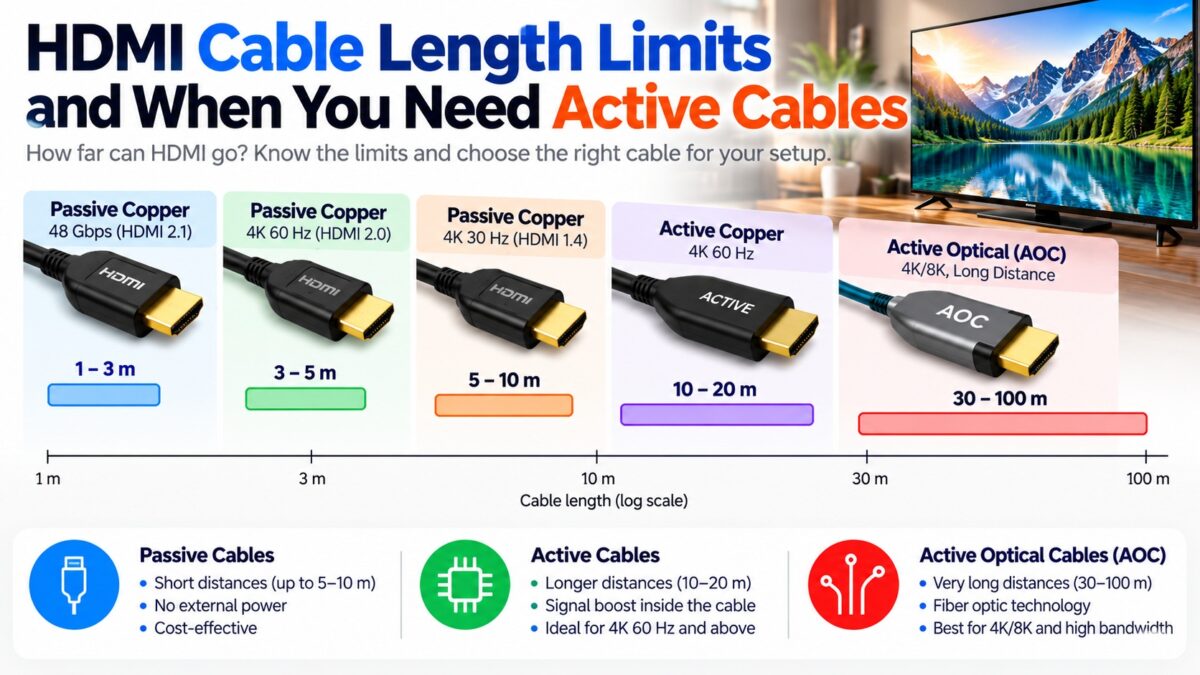
The HDMI specification sets no official maximum cable length, so the practical limit depends on how much bandwidth you send and how well the cable is built. As a rough guide, a passive copper cable can run about 5 to 10 meters (16 to 33 feet) for 1080p or 4K at 30 Hz, about 3 to 5 meters (10 to 16 feet) for 4K at 60 Hz with HDR, and only about 1 to 3 meters (3 to 10 feet) for the 48 Gbps modes of HDMI 2.1, such as 4K at 120 Hz. Beyond those lengths you need an active cable, an active optical cable (AOC), or an extender such as HDBaseT. Sources disagree on the exact numbers, so treat them as starting points, not guarantees.
Why does cable length matter?
HDMI is a high-speed digital signal, and in a passive copper cable it weakens as it travels. The faster the signal, the faster it weakens, so a cable that is fine for 1080p can fail for 4K at the same length. When the signal gets too weak, the receiver can’t recover the data cleanly, and you see problems rather than a gradual blur.
The HDMI Forum doesn’t publish a single length limit. Instead, each cable is tested and certified for specific speeds, and for the Ultra High Speed category the certification program requires each model and each length to be tested separately.
Typical HDMI cable length limits
These figures are rough guidance compiled from several cable makers and guides. They vary by brand, wire gauge and build quality.
| Use | Typical passive copper limit | Beyond that |
| 1080p or 4K at 30 Hz (High Speed) | About 5 to 10 m (16 to 33 ft) | Active cable or extender |
| 4K at 60 Hz with HDR (Premium High Speed) | About 3 to 5 m (10 to 16 ft) | Active cable, optical cable or extender |
| 4K at 120 Hz and 8K (Ultra High Speed, 48 Gbps) | About 1 to 3 m (3 to 10 ft) | Active optical cable (AOC) |
| HDMI 2.2 (Ultra96, up to 96 Gbps) | Not yet established; expect shorter | Active optical cable (AOC) |
One source notes that early testing for the Ultra High Speed program suggested passive cables of up to about five meters could pass, which shows how much the figure depends on the cable. Always check the length that a certified cable is rated for rather than relying on a rule of thumb.
What is an active HDMI cable?
An active HDMI cable contains a small circuit that boosts or re-times the signal, so it can travel farther than a passive cable. The cable still uses copper. Typical guidance puts active copper cables at about 10 to 20 meters (33 to 65 feet) for 4K at 60 Hz, and shorter, about 3 to 10 meters, for 4K at 120 Hz. Active cables often have a marked source end and display end and must be plugged in the right way round, and some draw their power from the HDMI connection.
What is an active optical HDMI cable (AOC)?
An AOC carries the video signal as light through glass fibers inside the cable, with small converters at each end. Because light loses little strength over distance, optical cables can span much longer runs, typically about 30 meters up to 100 meters or more, and they are the usual choice for full-bandwidth 4K 120 Hz and 8K over longer distances. They are also thin and light, which helps when you pull them through a wall or conduit. The first Ultra High Speed active optical cable was certified in December 2020.
What is an HDMI extender or HDBaseT?
An extender sends the HDMI signal over a different type of cable. HDBaseT, for example, carries HDMI over standard network cable such as Cat5e or Cat6, with a transmitter at the source and a receiver at the display. It can reach about 100 meters (330 feet) and is common in commercial installations and large homes. It needs two boxes and a power supply for each, and the maximum resolution depends on the model.
How far can each option go?
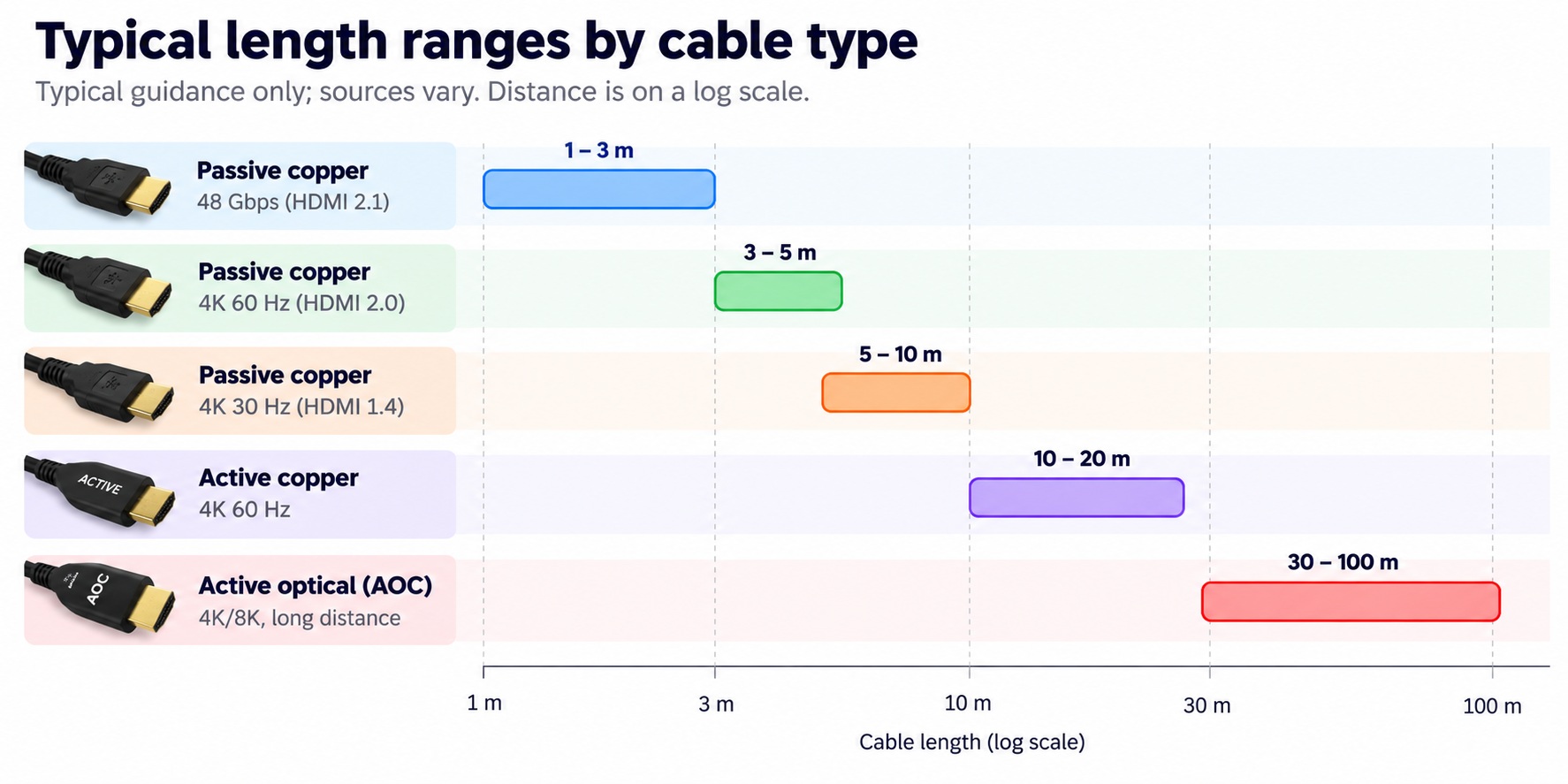
typical HDMI cable length ranges by type
HDBaseT extenders also reach about 100 meters, over network cable instead of an HDMI cable.
How do you know if your HDMI cable is too long?
A signal that is too weak shows up in typical ways:
- sparkles or flickering on the screen;
- the picture dropping out and returning;
- no signal at all;
- the device falling back to a lower resolution or refresh rate.
These can also come from a bad cable, a worn connector or a device limit, so check them against one another.
How do you choose the right cable for a long run?
- Measure the route, not the straight line. Add slack for bends and for the connectors.
- Decide the video mode you need, such as 4K at 60 Hz or 4K at 120 Hz. The faster the mode, the shorter the passive limit.
- Prefer a certified cable with its official name and certification label. Ultra High Speed cables are tested per model and per length.
- Switch to active or optical when the length is beyond what a passive cable can reliably do for your mode. For in-wall runs, an optical cable is often the best option.
- Use an extender such as HDBaseT when you need to cross a large house or building.
- Test before you hide the cable. Run the cable in the open first, check that you can get your target resolution and refresh rate, and only then route it through walls.
Common questions
What is the maximum length of an HDMI cable?
There is no official maximum. Passive cables work reliably over a few meters at high speeds, and active, optical and extender solutions go from tens of meters to 100 meters or more.
How long can a 4K HDMI cable be?
Around 3 to 5 meters for passive 4K at 60 Hz with HDR, but sources vary. Longer than that needs an active or optical cable.
Can I use a 10-meter HDMI cable for 4K 120 Hz?
A passive copper cable of that length is unlikely to carry a full 48 Gbps reliably. An active optical cable is the usual solution.
Do longer HDMI cables reduce picture quality?
Not gradually. A digital HDMI signal either arrives intact or shows problems such as sparkles and dropouts, so quality does not fade with length until the cable is too long.
Is an optical HDMI cable better than copper?
For long runs and high bandwidth, yes. Over short runs, a certified passive copper cable is cheaper and works well.
Does HDMI ARC need a short cable?
No. ARC and eARC use the same cable as the rest of the connection, so the length limit depends on the video mode.



3 comments