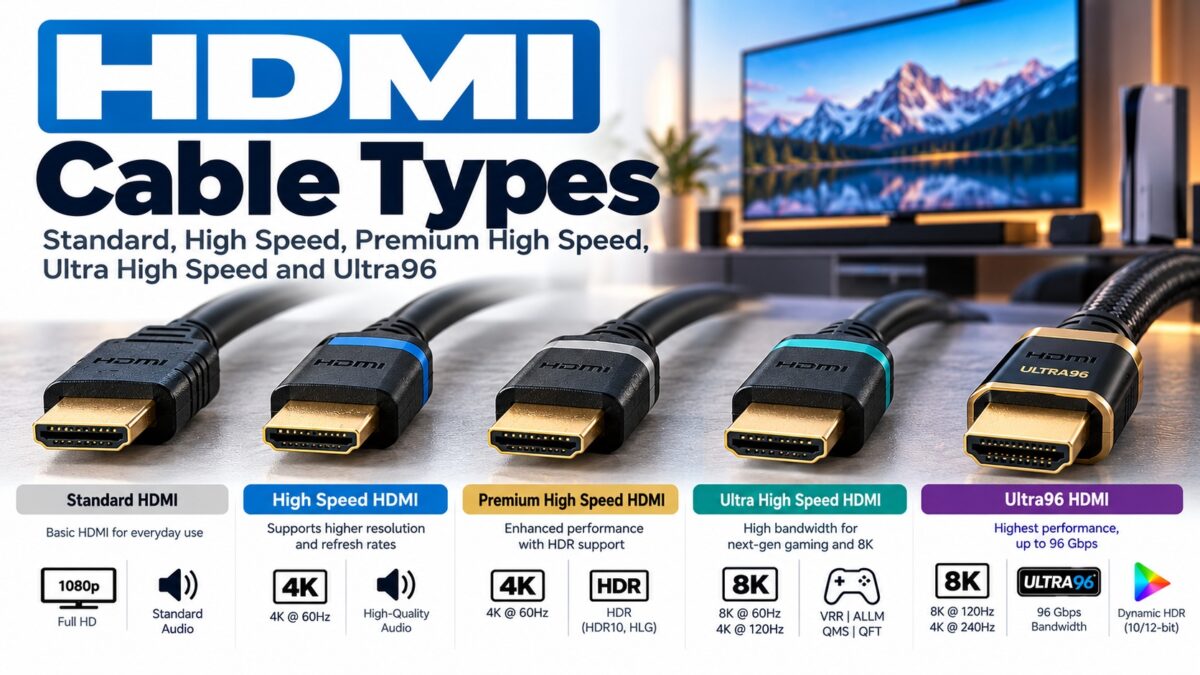
HDMI Cable Types
There are five official HDMI cable types: Standard, High Speed, Premium High Speed, Ultra High Speed and Ultra96. They differ in the bandwidth they are tested to carry, from a few gigabits per second on a Standard cable up to 96 Gbps on an Ultra96 cable. For most 4K TVs and streaming boxes, a Premium High Speed cable is enough. For HDMI 2.1 gaming at 4K 120 Hz or 8K, you need an Ultra High Speed cable. The cable’s official name, printed on the jacket and packaging, is what tells you which type you have.
HDMI cable types at a glance
| Cable name | Bandwidth | Designed and tested for | Certification label |
| Standard | 2.22 Gbps | 720p and 1080i | No |
| High Speed | Up to 10.2 Gbps | 1080p and 4K at 30 Hz | No |
| Premium High Speed | 18 Gbps | 4K at 60 Hz, HDR and wider color spaces such as BT.2020 | Yes, with QR code |
| Ultra High Speed | Up to 48 Gbps | HDMI 2.1 features, such as 4K at 120 Hz and 8K | Yes, with QR code |
| Ultra96 | Up to 96 Gbps | HDMI 2.2 features | Yes, with QR code |
The bandwidth figures and use cases come from HDMI.org and HDMI Licensing Administrator (HDMI LA). The Standard cable’s 2.22 Gbps figure is from an industry write-up, not HDMI.org.
Standard HDMI cable
The Standard cable is the original category, introduced around 2007 together with High Speed and sometimes called Category 1. It is designed for 720p and 1080i video. You will only find it on very old equipment or in a drawer of cables you no longer use. It is not suitable for modern 4K sources.
High Speed HDMI cable
High Speed (sometimes called Category 2) is designed and tested for 1080p and 4K at 30 Hz, including features such as Deep Color and 3D, at up to 10.2 Gbps. HDMI.org notes that some High Speed cables may also carry other features such as 4K at 60 Hz, but that is not what the name guarantees. A High Speed cable is fine for a streaming stick plugged into a 1080p screen.
Premium High Speed HDMI cable
Premium High Speed is a special certification for High Speed cables. It is tested and certified for 18 Gbps, which covers 4K at 60 Hz with HDR and expanded color spaces. These cables are designed for low electromagnetic interference. Each certified product carries an authentication label with an anti-counterfeit feature and a QR code you can scan to check it online.
This is the sensible choice for most 4K TVs, streaming boxes, Blu-ray players and soundbars.
Ultra High Speed HDMI cable
Ultra High Speed cables were introduced with the HDMI 2.1 specification and reached the market in 2020. They are certified for up to 48 Gbps, which is what HDMI 2.1 devices need for modes such as 4K at 120 Hz and 8K. Testing is mandatory not only for each cable model but also for each length, because electrical performance can vary with length. The label includes anti-counterfeit technology and a QR code.
If you have a PlayStation 5, an Xbox Series X or a PC running 4K at 120 Hz, this is the cable to use.
Ultra96 HDMI cable
Ultra96 is the newest type, introduced with HDMI 2.2, and supports up to 96 Gbps. Ultra High Speed and Ultra96 are both part of the HDMI Ultra Cable Certification Program, and you can scan the label’s QR code to confirm that a cable was tested for the HDMI 2.2 specification. You only need one if a device uses the Ultra96 feature name and you want its full performance. Ultra High Speed cables remain correct for systems up to 48 Gbps.
Which HDMI cable do you need?
Match the cable to the most demanding thing you will send through it.
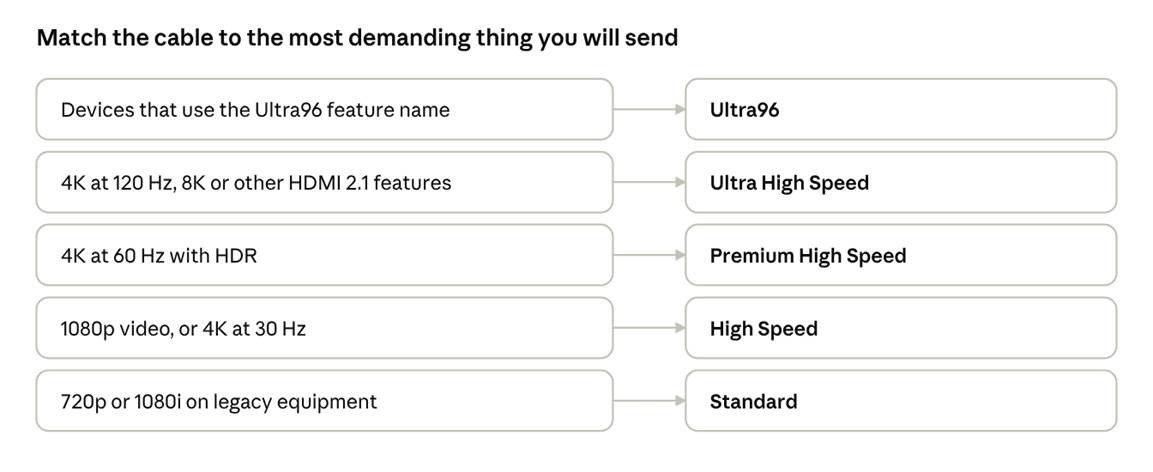
HDMI cable type by use · from Standard to Ultra96
Pick the cable that covers your most demanding device; a higher-rated cable also works.
How to tell which cable you have
- Read the jacket. HDMI cables must show their official cable name on the jacket, so check for words such as Premium High Speed or Ultra High Speed printed on it.
- Check the packaging. Packaging must show the cable name logo or the certification label.
- Scan the label. Premium High Speed, Ultra High Speed and Ultra96 labels include a QR code for online verification.
- Be wary of vague claims. Claims such as “8K ready” or a bare HDMI version number are not official cable names. HDMI LA says cables should be marketed by their official names only.
Do older cables work with newer devices?
Yes. Ultra High Speed cables are backward compatible with older devices, and older cables work with HDMI 2.1 devices. The device will simply be limited to what the cable can carry, so you will not get the full 48 Gbps without an Ultra High Speed cable. This is the same weakest-link rule explained in our beginner’s guide.
Copper and fiber (active optical) cables
Most HDMI cables are copper. Some longer cables use fiber inside, called active optical cables (AOC). The first Ultra High Speed AOC was certified in December 2020, so both construction types can carry the official certification.
Common questions
What is the difference between High Speed and Premium High Speed?
High Speed is designed for 1080p and 4K at 30 Hz at up to 10.2 Gbps. Premium High Speed is certified for 18 Gbps and for 4K at 60 Hz with HDR, and its certification label lets you verify it.
Do I need an Ultra High Speed cable for a 4K TV?
Not usually. For 4K at 60 Hz, Premium High Speed is enough. You need Ultra High Speed for 4K at 120 Hz, 8K and other HDMI 2.1 features.
Do I need an Ultra96 cable for HDMI 2.2?
Only for devices that use the Ultra96 feature name and only to get their top bandwidth. Everything up to 48 Gbps works with Ultra High Speed.
Can a bad cable cause problems even if the picture looks fine at low resolution?
Yes. An under-rated cable commonly shows up as dropouts, flickering or a lower mode when you try a higher resolution or refresh rate, rather than a softer picture.
Does an expensive HDMI cable give a better picture?
The official name and certification label tell you what a cable is tested for. A cable that meets a category does not need to cost more to deliver that category’s performance.
Keep learning
- What Is HDMI? A Beginner’s Guide (CON-HDMI-001)
- HDMI Connector Types Explained (CON-HDMI-002)
- HDMI Versions Compared: 1.4 vs. 2.0 vs. 2.1 (CON-HDMI-008)
- Internal link: HDMI Cable Length Limits (CON-HDMI-017)