How Much Bandwidth Does HDMI 2.1 Have?
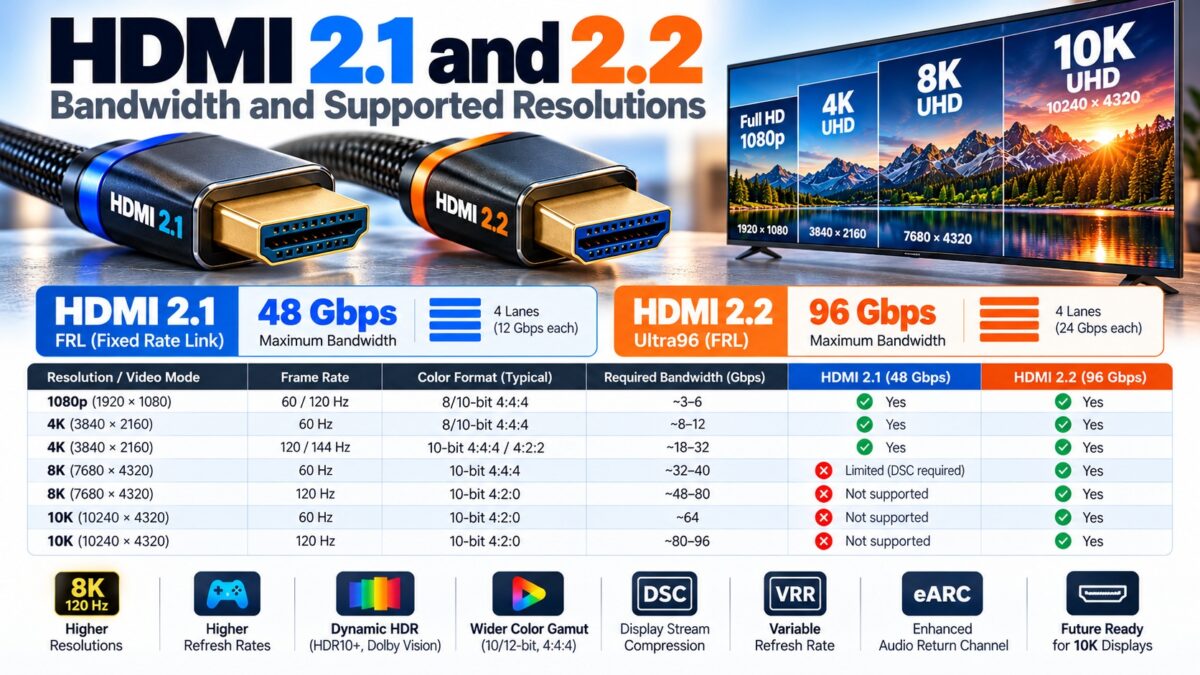
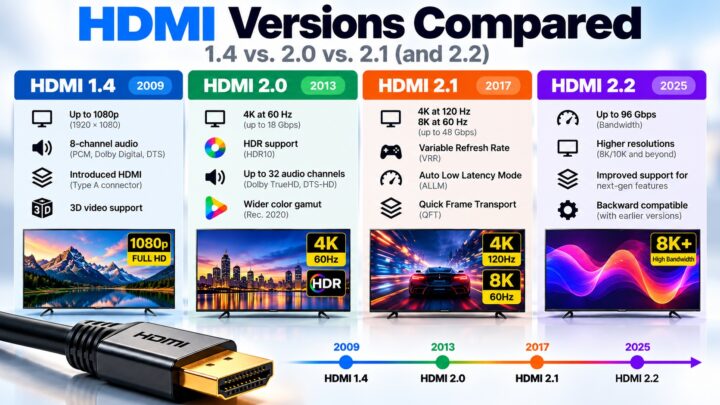
HDMI 2.1 has up to 48 Gbps of raw bandwidth, which leaves about 42.67 Gbps for actual video, audio and data after encoding overhead, and HDMI 2.2 doubles the raw figure to 96 Gbps. HDMI 2.1 is enough for 4K at 120 Hz with full 10-bit or even 12-bit RGB color, and for 8K at 60 Hz when chroma subsampling or Display Stream Compression (DSC) is used. HDMI 2.2 adds uncompressed 8K at 60 Hz and 4K at 240 Hz with full color, and supports up to 12K at 120 Hz and 16K at 60 Hz. HDMI 2.0, by comparison, offers 18 Gbps raw, or about 14.4 Gbps usable. The usable figure, not the headline number, is what decides whether a resolution, refresh rate and color format fit.
What are the HDMI 2.1 link rates?
HDMI 2.1 introduced Fixed Rate Link (FRL) signaling. Through a process called link training, the two devices agree on three or four lanes at speeds between 3 and 12 Gbps per lane, up to a total of 48 Gbps. FRL uses 16b/18b encoding, which is about 88.9 percent efficient. The older TMDS encoding is only 80 percent efficient, because it sends 10 bits for every 8 bits of data.
| Link | Lanes and speed | Raw bandwidth | Usable bandwidth |
| HDMI 1.4 (TMDS) | 3 data channels | 10.2 Gbps | 8.16 Gbps |
| HDMI 2.0 (TMDS) | 3 data channels | 18 Gbps | 14.4 Gbps |
| FRL, 3 lanes | 3 × 6 Gbps | 18 Gbps | 16.0 Gbps |
| FRL, 4 lanes | 4 × 6 Gbps | 24 Gbps | 21.33 Gbps |
| FRL, 4 lanes | 4 × 8 Gbps | 32 Gbps | 28.44 Gbps |
| FRL, 4 lanes | 4 × 10 Gbps | 40 Gbps | 35.56 Gbps |
| FRL, 4 lanes | 4 × 12 Gbps | 48 Gbps | 42.67 Gbps |
The usable figures follow from the encoding: 80 percent for TMDS and 16/18 for FRL.
Which modes fit on which link?
The chart compares each link’s usable bandwidth with three common video modes. A mode fits only if its line sits to the left of the bar’s end. The Ultra96 bars are estimates.
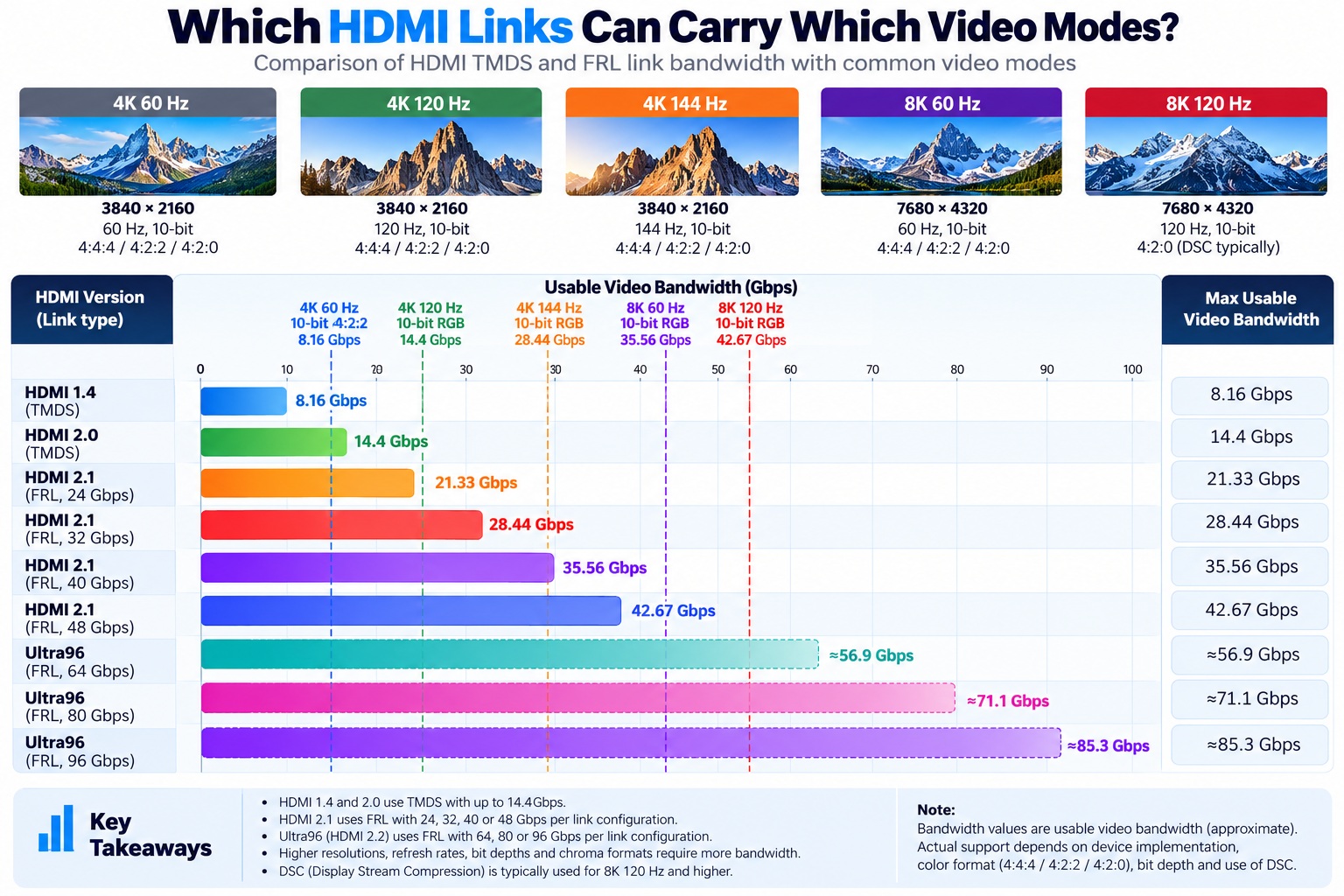
usable bandwidth of HDMI links vs three video modes
The 40 Gbps link and longer bars reach the 4K 120 Hz line, and only the 48 Gbps and Ultra96 bars pass 4K 144 Hz.
What resolutions does HDMI 2.1 support?
HDMI 2.1 supports resolutions and refresh rates that HDMI 2.0 cannot carry, including 4K at 120 Hz, 8K at 60 Hz and even 10K. In practice:
- 4K at 120 Hz works without any compression, at full 4:4:4 RGB and up to 12-bit color.
- 5K at 120 Hz works the same way, but only up to 8-bit color. At 10-bit or 12-bit it needs DSC.
- 8K is supported at several refresh rates, but DSC is needed for the higher ones. To reach 60 Hz you need DSC unless you drop to 4:2:0 chroma, and at 120 Hz you need DSC even at 8-bit.
- Up to 10K is supported mainly for commercial and industrial uses. At 60 Hz and above it needs DSC, and some modes also need chroma subsampling.
DSC is required for all video above 8K at 60 Hz.
Which video modes need what?
| Video mode | HDMI 2.0 | HDMI 2.1 without compression | HDMI 2.1 with DSC |
| 4K at 60 Hz, 8-bit RGB | Yes | Yes | Yes |
| 4K at 60 Hz, 10-bit HDR | Only with 4:2:2 | Yes, in RGB | Yes |
| 4K at 120 Hz, 10-bit RGB | No | Yes, on a 40 Gbps or 48 Gbps link | Yes |
| 4K at 144 Hz, 10-bit RGB | No | Yes, on a 48 Gbps link | Yes |
| 8K at 60 Hz | No | Only with 4:2:0 chroma | Yes |
| 8K at 120 Hz | No | No | Yes |
Why is usable bandwidth lower than 48 Gbps?
Two things take a share of the link:
- Encoding overhead. FRL spends 2 of every 18 bits on encoding, leaving 16 for data.
- Blanking. Video timings include blanking intervals around the visible picture, and the link has to carry them too, so a mode needs more than the raw pixel data alone suggests.
That is why 4K at 120 Hz with 10-bit RGB needs about 30 Gbps of video payload, and therefore a 40 Gbps or 48 Gbps link rather than a 32 Gbps one. Online bandwidth calculators estimate this; check the numbers for your own mode before you buy hardware.
What are chroma subsampling and DSC?
Both are ways to fit a mode on a link that would otherwise be too slow.
- Chroma subsampling stores color at lower resolution than brightness. YCbCr 4:2:2 uses about a third less bandwidth than full RGB or 4:4:4, and 4:2:0 uses about half as much. HDMI 2.0 already supports 4:2:0.
- Display Stream Compression (DSC) compresses the video signal. It is described as visually lossless, and it can reduce the bandwidth needed by up to about 3:1. Both devices must support it, and it is only available in FRL mode.
Do you need the full 48 Gbps?
Often not. The 2020 LG OLED TVs, for example, have HDMI 2.1 ports limited to 40 Gbps rather than 48 Gbps. Because their panels are native 10-bit, 40 Gbps is enough to carry 4K at 120 Hz with full color. For real-world TVs and consoles, 40 Gbps is already close to what the screen can show. The extra headroom matters mostly for PC monitors at 144 Hz or higher and for 8K.
Which cable do you need?
To use the full 48 Gbps you need a certified Ultra High Speed cable. Older cables are not certified for these speeds, so an HDMI 2.1 connection may drop to a lower mode or fail with one.
Products that show the Ultra96 name need an Ultra96 cable to reach their maximum bandwidth, as the HDMI 2.2 section below explains.
What if my 4K 120 Hz HDR mode doesn’t work?
Try these steps in order:
- Make sure both the source and the display are using HDMI 2.1 ports with the feature turned on.
- Use a certified Ultra High Speed cable.
- Try 10-bit RGB first, then YCbCr 4:2:2, and only then lower the refresh rate.
What Are the HDMI 2.2 Link Rates and Resolutions?
HDMI 2.2, released by the HDMI Forum in 2025, doubles the maximum bandwidth to 96 Gbps and uses a next-generation version of Fixed Rate Link. Not every HDMI 2.2 product reaches the top speed. Manufacturers are encouraged to use the Ultra96 feature name to show that a product supports a maximum of 64, 80 or 96 Gbps, so the name alone does not tell you which of the three tiers a product has.
| Ultra96 tier | Raw bandwidth | Estimated usable bandwidth |
| Ultra96, 64 Gbps | 64 Gbps | about 56.9 Gbps |
| Ultra96, 80 Gbps | 80 Gbps | about 71.1 Gbps |
| Ultra96, 96 Gbps | 96 Gbps | about 85.3 Gbps |
The usable figures are my estimates. They assume HDMI 2.2 keeps the 16b/18b encoding of HDMI 2.1 (a factor of 16/18), which the sources used for this article do not state directly.
According to the HDMI Forum, HDMI 2.2 supports:
- Resolutions and refresh rates up to 12K at 120 Hz and 16K at 60 Hz.
- Uncompressed full-chroma formats, including 8K at 60 Hz in 4:4:4 and 4K at 240 Hz in 4:4:4 at 10-bit and 12-bit color. On HDMI 2.1, these modes need DSC or chroma subsampling.
- One report adds 4K at 480 Hz with 4:2:0 chroma subsampling. Check the specification before relying on that figure.
Products that show the Ultra96 name need an Ultra96 cable to reach their maximum bandwidth. The existing Ultra High Speed cable remains applicable to systems up to 48 Gbps. Like Ultra High Speed cables, Ultra96 cables are part of the HDMI Cable Certification Program, which requires each model and length to be tested and to carry a certification label.
Common questions
Can HDMI 2.1 do 4K 120 Hz?
Yes, without compression, at up to 12-bit color. You need a 40 Gbps or 48 Gbps link and an Ultra High Speed cable.
Can HDMI 2.1 do 8K at 60 Hz?
Yes, but it needs DSC, or chroma subsampling down to 4:2:0.
What is the real bandwidth of HDMI 2.1?
About 42.67 Gbps usable on a 48 Gbps link, after 16b/18b encoding.
Does HDMI 2.0 support 4K 120 Hz?
No. HDMI 2.0’s usable bandwidth is about 14.4 Gbps, which is not enough.
Is DSC required for 4K 120 Hz?
No. 4K at 120 Hz fits within 48 Gbps without DSC. DSC is needed for higher modes, such as 8K at 120 Hz.
Can HDMI 2.2 do 4K 240 Hz without compression?
Yes. According to the HDMI Forum, HDMI 2.2 supports 4K at 240 Hz in 4:4:4 at 10-bit and 12-bit color without compression. HDMI 2.1 needs DSC for that mode.
What does Ultra96 mean?
Ultra96 is a feature name that manufacturers use to show that a product supports a maximum of 64, 80 or 96 Gbps under HDMI 2.2. Products that show it need an Ultra96 cable to reach their maximum bandwidth.
How much bandwidth does HDMI 2.2 have?
Up to 96 Gbps raw, double HDMI 2.1’s 48 Gbps. Some products support only 64 or 80 Gbps.her modes, such as 8K at 120 Hz.
Keep learning
- What Is HDMI? A Beginner’s Guide (CON-HDMI-001)
- HDMI Versions Compared: 1.4 vs. 2.0 vs. 2.1 (CON-HDMI-008)
- HDMI Cable Types (CON-HDMI-003)
- How HDMI Works: TMDS and Data Channels (CON-HDMI-009)
- VRR, ALLM and QMS in HDMI 2.1 Explained (CON-HDMI-016)
- HDMI Cable Length Limits and When You Need Active Cables (CON-HDMI-017)
1 comment