What Is the Difference Between FRL and TMDS?
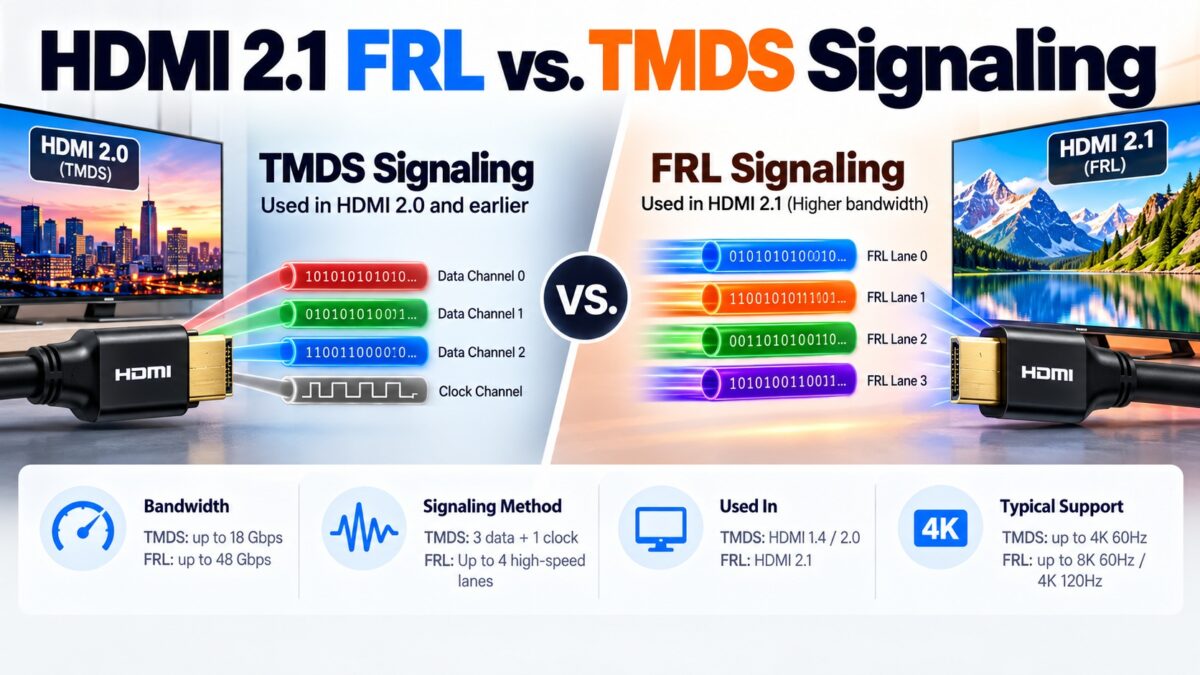
TMDS is the original HDMI signaling method, with three data lanes plus a separate clock lane and 8b/10b encoding, topping out at 18 Gbps. FRL (Fixed Rate Link) is the newer method introduced with HDMI 2.1, which turns the clock lane into a fourth data lane, embeds the clock in the data, uses a more efficient 16b/18b encoding and reaches 48 Gbps. The connector and pins stay the same: the pairs that carried TMDS data 0, 1 and 2 become FRL lanes 0, 1 and 2, and the old clock pair becomes lane 3. FRL is only used when both devices support it, and the two sides agree on a speed in a process called link training. If training fails, the link falls back to TMDS.
FRL vs. TMDS at a glance
| Feature | TMDS (HDMI 1.x and 2.0) | FRL (HDMI 2.1) |
| Data lanes | 3 | 3 or 4 |
| Clock | Separate clock pair, running at 1/10 or 1/40 of the data rate | Embedded in the data and recovered by the receiver (clock data recovery) |
| Encoding | 8b/10b, about 80% efficient | 16b/18b, about 88.9% efficient |
| Maximum rate per lane | About 6 Gbps (5.94 Gbps for TMDS coding) | 12 Gbps |
| Maximum total | 18 Gbps | 48 Gbps |
| Coupling | DC-coupled | AC-coupled |
| Link training | Not needed | Required |
| Error handling | None added beyond the encoding | Character error detection required in the sink, with forward error correction (Reed-Solomon) |
| Signal edges | Minimum rise time 42.5 ps | Minimum rise time 22.5 ps |
| Cable | High Speed or Premium High Speed | Ultra High Speed (Category 3) |
How does TMDS work?
TMDS sends video, audio and data over three differential data lanes, with a fourth pair carrying a clock that tells the receiver when to sample the data. Each 8-bit value is encoded as a 10-bit character, so 20 percent of the link carries overhead. The data rate per lane is the pixel clock times 10 times a color depth ratio, so higher resolutions and color depths push the lane rate up until it reaches the limit of about 6 Gbps per lane. Our how-HDMI-works guide explains the three transmission periods and the encoding in more detail.
How does FRL work?
FRL changes four things:
- The clock lane carries data. In FRL mode the pins that used to carry the TMDS clock become a fourth data lane. The clock information is embedded in the 16b/18b coded data, and the receiver extracts it using clock data recovery.
- More efficient encoding. 16b/18b encoding sends 18 bits for every 16 bits of data, which is about 88.9 percent efficient, against 80 percent for TMDS. For the same raw rate, that is about 9 to 11 percent more usable bandwidth.
- Fixed lane rates. The link runs at one of a set of fixed speeds, agreed during link training. With three lanes the choices are 3 and 6 Gbps per lane. With four lanes they are 6, 8, 10 and 12 Gbps per lane. Our bandwidth guide lists the total and usable bandwidth for each combination.
- Packets, scrambling and error correction. FRL sends data in packets, scrambles it, and uses forward error correction so the receiver can repair some bit errors, which matters at 12 Gbps per lane. Equalization in the transmitter and receiver also helps compensate for loss in the cable.
What is FRL link training?
Before FRL carries video, the source and the display have to find a lane count and speed that the cable and both devices can handle. This is link training, and it is needed whenever the connection starts or the rate changes. It runs over the SCDC channel on the DDC lines and goes through a series of states.
How link training moves between states
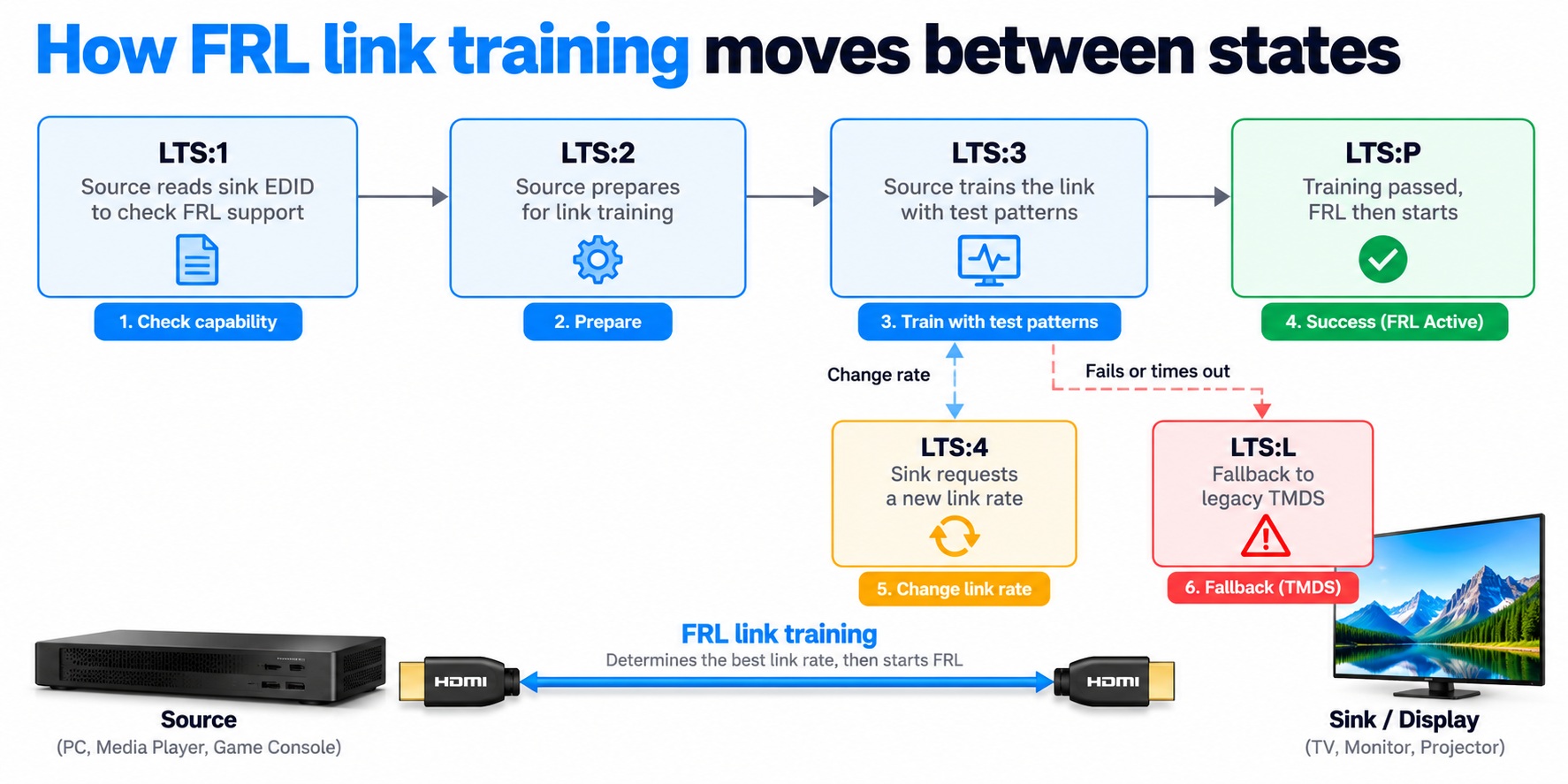
FRL link training states
A failed or timed-out training run ends in legacy TMDS instead of FRL.
What happens if FRL fails?
If link training fails or times out, the source and display fall back to legacy TMDS, which is the HDMI 1.4 and 2.0 mode. You then get the modes TMDS can carry, for example 4K at 60 Hz, but not the modes that need FRL, such as 4K at 120 Hz. This is a common reason why a connection with a poor cable runs at a lower mode than expected, and it is one reason the cable has to be good enough for the speed the devices try. See our cable types guide.
Why did HDMI need FRL?
TMDS runs out of room. Its per-lane rate tops out around 6 Gbps, one of its four pairs carries only a clock, and 20 percent of the bits are encoding overhead. FRL fixes all three: the lane rate doubles to 12 Gbps, the fourth pair carries data, and the overhead drops to about 11 percent. That is what allows 48 Gbps over the same 19-pin connector, and it is what makes features such as 4K at 120 Hz and 8K at 60 Hz possible on HDMI 2.1.
Common questions
What does FRL stand for?
Fixed Rate Link.
Does HDMI 2.1 still use TMDS?
Yes, as a fallback. If the other device doesn’t support FRL, or link training fails, the link runs in TMDS mode.
Is FRL the same as DSC?
No. FRL is the way the signal is sent over the cable. DSC (Display Stream Compression) compresses the video before it is sent, and it works in FRL mode.
Do HDMI 2.1 cables need to be different for FRL?
For the top speeds, yes. FRL’s 12 Gbps lanes need a certified Ultra High Speed cable.
Why does FRL have four lanes and TMDS only three data lanes?
FRL uses the former clock pair as a fourth data lane, because the clock is now embedded in the data.
Does the HDMI connector change for FRL?
No. The pins are the same. Only their use changes in FRL mode.
1 comment